
Choosing between Power BI and Jet Reports depends on what you want from your reporting solution.
Power BI is better suited to interactive dashboards, visual analytics, cross-department reporting, and broader business intelligence. Jet Reports is particularly useful for finance and operational teams that prefer to build and work with reports inside Excel.
Both can work well with Microsoft Dynamics data, but they solve different reporting requirements. This comparison looks at where each tool fits and which may be more suitable for your business.
Power BI or Jet Reports – Which Is Better?
Neither tool is automatically better for every business.
Power BI is usually a better choice for businesses that need interactive dashboards, clear data visualisations, and reports from different data sources.
It allows users to analyse business data, track important KPIs, create visual reports, and share insights across teams. Power BI also continues to improve with Microsoft AI and Copilot capabilities.
Jet Reports is useful for businesses that mainly need detailed financial and operational reports in Excel. It works well for finance teams that are comfortable using spreadsheets, but it offers fewer options for interactive dashboards and visual analytics.
In simple terms:
- Choose Power BI if you need dashboards, data visualisation, wider analytics, AI features, and reporting across different data sources.
- Choose Jet Reports if your main requirement is Excel-based financial and operational reporting.
For businesses looking for a more flexible business intelligence and data analytics solution, Power BI is generally the better option.
What happens if you don’t use this?
If you think not to use either of these (Microsoft Power BI or Jet Reports), it will make a huge problem to run the business smoothly. You might not have realised how any report sharing on the cloud becomes easy. You always face the trouble of pulling the big data from a wide range of systems.
Is Power BI better than Jet Reports?
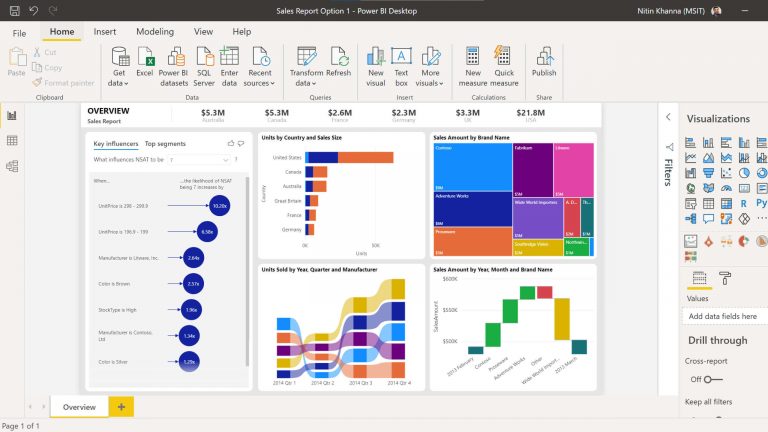
It is beneficial in reporting and analytics for Microsoft Dynamics. While researching Microsoft Power BI vs Jet Report, check the key points of Power BI
- Power BI can handle business intelligence for all, and this appears as a significant benefit for the Power BI users
- Microsoft Power BI manages perfectly
- Power BI is secure
- Artificial intelligence capabilities are available in Power BI
- It can efficiently share the content in Power BI apps
- After every particular time, Power BI is constantly getting improvised
You don’t require the Jet Enterprise for Power BI. In terms of data visualisation tools, Power BI is the best. In Microsoft Power BI, users can easily connect with multiple data points to deliver a functional information analysis. Easily get associated with sources including Excel, social networks, and google analytics.
Power BI can collect the data from these sources to generate informative graphics which make adequate information. The dashboard is so user-friendly and can view all the information on a real-time basis, make all the shared files secure, and all the accessed data gets controlled.
Overall, Power BI showcases many benefits. Its real-time reports or dashboards in business intelligence assets can be accessed by other dedicated members of any organisation. Based on real-time data entire firm can make crucial decisions. Its very effective in terms of data visualisation. Reports can quickly be published to the cloud of Power BI and can be seen or accessed from anywhere.
Choosing from pie charts, column charts, heat maps, scatter plots, etc., users can efficiently connect the data to Power BI. It clarifies which data or information is sensitive to handle.
AI and Copilot Capabilities in Power BI
AI capabilities in Power BI have developed significantly beyond features such as Q&A, Key Influencers, and Decomposition Tree.
Power BI now includes Copilot experiences that can help users explore information using natural language, summarise reports, ask questions about report data, and support report and semantic model creation.
For report creators, Copilot can also assist with tasks such as analysis and DAX generation, depending on the available Power BI and Microsoft Fabric environment.
These capabilities make Power BI increasingly useful for organisations that want to combine traditional business intelligence with generative AI-assisted analytics.

Power BI vs Jet Reports Comparison
Positioning of Product – Power BI has rich data visualisation, whereas Jet Report is a purpose-built financial and operational reporting solution built inside Microsoft Excel.
Real-Time Reporting – Power BI supports different data connectivity modes. Import models require data refreshes, while DirectQuery can query supported underlying data sources when users interact with reports. Jet Reports can retrieve current information directly from supported ERP data sources when reports are run or refreshed.
Microsoft confirms that Power BI Import models need data refreshes, whereas DirectQuery queries the underlying source instead of importing the data.
Report Scheduling and Distribution – Power BI can refresh the data model in a schedule, and Jet Reports can also allow reports to be refreshed automatically, saved in several different formats.
Access to custom tables and fields – In Power BI, it can access the custom tables that require custom queries to be written as objects in Dynamics NAV/BC. Pages can also be published as web services. Jet Reports can access the entire database.
Multi-Company Reporting – In Power BI, it is very efficient to pull the data from multiple companies with the Power Query Editor. Same in Jet Report also has the ability to pull the report from multiple data sources.
Flow Fields – Power BI can access the flow fields while connecting via web services, whereas Jet Report is also able to access flow fields whether connecting via direct SQL or web services.
Formatting – It is available in Power BI, whereas Jet Report also has the same feature.
Power BI vs Jet Reports: Which Should Business Central Users Choose?
For Dynamics 365 Business Central users, the choice often depends on how different teams want to consume information.
| Requirement | Better Fit |
|---|---|
| Excel-based financial reporting | Jet Reports |
| Interactive dashboards | Power BI |
| Finance users who work mainly in Excel | Jet Reports |
| Visual business analytics | Power BI |
| Operational Business Central reporting | Jet Reports |
| Reporting across multiple departments | Power BI |
| Ad hoc Excel reporting | Jet Reports |
| Management dashboards and KPIs | Power BI |
Jet Reports continues to receive product updates and support for Business Central environments. Its 2026 releases include updates related to Business Central Cloud connections, multi-company reporting, authentication, and Jet Hub.
For some organisations, using both tools can make sense: Jet Reports for detailed finance reporting and Power BI for visual analytics and management dashboards.
The key roles of Power BI –
While proceeding further with the differences in this bog between Jet Report vs power BI, let us check the key roles of Power BI-
- It can work effectively and adequately on-premises and in cloud data
- Interactive and stunning visualisations you can share with the people
- Simplified answers to any complex questions
- Immediate and fruitful collaboration
- Access to a robust collection of learning materials
- Reasonable pricing
- Unlimited connectivity
- Supports many data sources
- Similarity with excel
- Rich visualisations
- Shared Datasets
- Large data handling capabilities
- Deployment Options
- Flexible collaboration
Power BI has four uses for the data flows:
1.) Team Collaboration – Enable teams collaboration while building your data retrieval and preparation processes
2.) Eliminate duplication of data retrieval processes – Ensure data retrieval has a minimal and consistent impact on your applications
3.) Provide a single source of truth – Build reports and visualisations on top of a single source of truth.
4.) Integrated common data model schemes – Map your organisation’s data to the standard data model quickly and easily.
Power BI vs Jet Reports: Final Verdict
Power BI and Jet Reports are built for different reporting needs.
Jet Reports is a strong choice for teams that prefer detailed Excel-based financial and operational reporting, while Power BI is better suited to interactive dashboards, data visualisation, and wider business intelligence.
For some organisations, both tools can also work together—Jet Reports for detailed reporting and Power BI for management dashboards and visual analysis.
If you are unsure which solution is the right fit, Dynamics Square can help you assess your reporting requirements, data sources, integrations, and business goals before choosing the right approach.
Contact Dynamics Square UK to discuss your Power BI, reporting, and analytics requirements with our Microsoft consultants.
See Also –
- Power BI vs Tableau [A Perfect Comparison]
- Power BI Pricing – Power BI Pro vs. Power BI Premium
- Power BI for Mac: How to use Power BI on Mac Devices?
- Powerful Reasons to Upgrade Accounting Software
- Top 13 Reasons to Implement Power BI For Your Business
- Why Power BI for your Business?
- Power BI Architecture: 7 Components Explained
.png&w=3840&q=75&dpl=dpl_FVRPKpu7xg2mRHG8Km7uAzyzDiN3)