Managing one warehouse is challenging enough.
When you add a second location, everyday decisions start taking a little longer. A third warehouse brings another layer of complexity. Before long, sales is checking stock in one location, purchasing is ordering products that already exist somewhere else, and warehouse teams are moving inventory simply to fulfil customer orders.
Table of Contents
- Why Multi-Warehouse Operations Become More Complex as Businesses Grow
- What Is Multi-Warehouse Management?
- Why Spreadsheets Eventually Create Inventory Problems
- How Does Business Central Manage Multiple Warehouses?
- Can Business Central Track Inventory Across Multiple Locations?
- How Does Business Central Handle Stock Transfers?
- How Does Business Central Improve Warehouse Operations?
- Can Business Central Reduce Inventory Discrepancies?
- How Does Business Central Optimise Warehouse Efficiency?
- What Are the Benefits of Multi-Warehouse Management in Business Central?
- Is Business Central Suitable for Businesses with Multiple Warehouses?
- Final Thoughts
- FAQs
None of that happens because people aren't doing their jobs.
It happens because different teams are working with different information.
As businesses grow, inventory is no longer stored in one place. It moves between warehouses, distribution centres, retail locations, and production facilities. Keeping track of that movement becomes just as important as knowing how much stock is available.
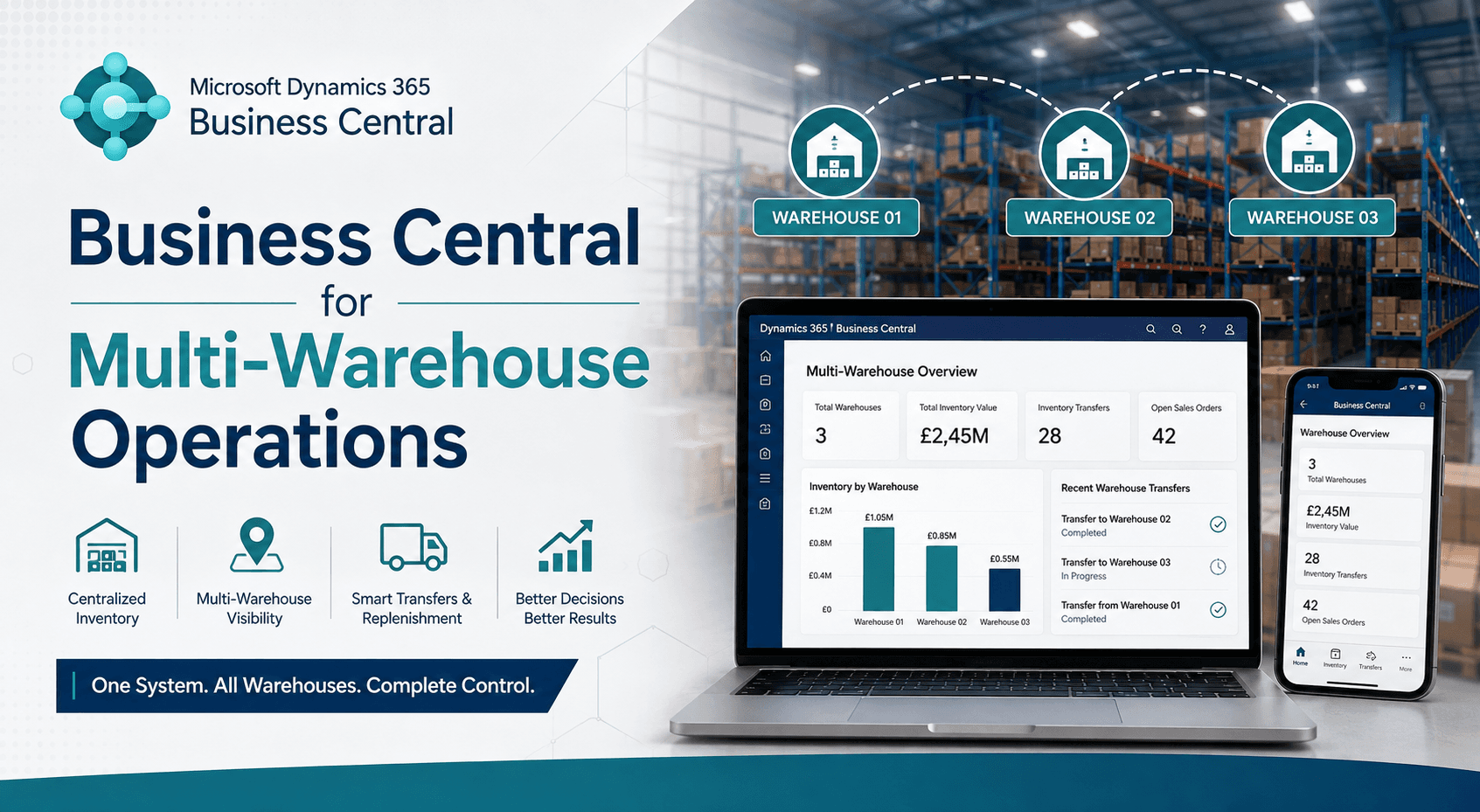
That's where Business Central Multi-Warehouse Management becomes useful. Instead of managing each location separately, Microsoft Dynamics 365 Business Central gives businesses a connected view of inventory, warehouse operations, and stock movements across multiple sites.
In this article, we'll look at why multi-warehouse inventory management becomes more difficult as businesses grow, how Business Central warehouse management improves inventory visibility, and why connected warehouse operations help businesses make faster and more confident decisions.
Why Multi-Warehouse Operations Become More Complex as Businesses Grow
Most businesses don't begin with several warehouses.
One location is often enough in the early years. Stock arrives, customer orders are picked, and inventory levels are relatively easy to monitor, but growth changes that.
A second warehouse opens to support another region. A third location is added to reduce delivery times. Manufacturing and distribution begin operating from different sites, while seasonal demand means inventory is constantly moving between locations.
The work itself doesn't become more difficult.
Keeping everyone working from the same information does.
It's common to see one warehouse holding surplus stock while another is waiting for replenishment. Purchasing may raise a new order without realising the same products are already available elsewhere.
Those situations don't always point to an inventory problem.
More often, they highlight a visibility problem.
What Is Multi-Warehouse Management?
Managing multiple warehouses isn't just storing products in different buildings.
It is knowing where inventory is, how it's moving, and which location is best placed to fulfil demand.
A customer order might be shipped from the nearest warehouse. Production could depend on materials arriving from another site. At the same time, warehouse teams are receiving deliveries, moving stock internally, and preparing outbound shipments.
Every one of those activities changes inventory levels.
When each location works from separate spreadsheets or disconnected systems, keeping stock records accurate becomes much harder.
Business Central inventory management connects warehouse locations. Instead of viewing inventory one warehouse at a time, businesses gain a clearer view across the entire operation.
Why Spreadsheets Eventually Create Inventory Problems
Many growing businesses manage additional warehouses the same way they managed the first one.
Another spreadsheet, another stock report, another manual update at the end of the day.
That approach often works for a while.
The problems appear when inventory starts moving regularly between locations.
Imagine Warehouse A transferring stock to Warehouse B early in the morning. Before the receiving team confirms the delivery, sales checks availability using yesterday's figures. Purchasing sees low stock levels and places another order, unaware that inventory is already on the way.
Nobody has made a mistake.
Each team is simply working with different information.
That's one reason many organisations move towards warehouse management software and ERP for warehouse management. The objective isn't to replace spreadsheets for the sake of it. It's to give every warehouse access to the same inventory information, regardless of where stock is stored.
How Does Business Central Manage Multiple Warehouses?
Managing several warehouses isn't simply about creating more locations in the system.
Every warehouse has its own inventory levels, receiving processes, picking activities, and stock movements. As more locations are added, keeping everything aligned becomes harder because each warehouse is operating independently.
Business Central Warehouse Management lets businesses manage multiple warehouse locations from one system. Inventory receipts, shipments, stock movements, and warehouse activities are recorded as part of daily operations, giving warehouse teams, purchasing, and sales access to the same information.
Microsoft Dynamics 365 Business Central also supports warehouse locations, bins, directed warehouse processes, and internal inventory movements. As operations become more complex, every warehouse continues working from the same inventory records instead of separate updates.
Can Business Central Track Inventory Across Multiple Locations?
This question usually comes up after a business opens another warehouse or starts supplying a new region.
Imagine a customer places an order for 300 units. Warehouse A has 120 in stock. Warehouse B has another 90. The remaining inventory is sitting in Warehouse C.
Without a connected system, someone ends up checking each warehouse before confirming the order. That might mean calling another location, checking yesterday's report, or waiting for someone to confirm the latest stock position.
Business Central inventory management brings inventory across multiple locations into one system. Sales teams can check availability more quickly, warehouse teams know what stock is available, and purchasing has a clearer picture before placing new orders.
Everyone is working from the same inventory records rather than trying to piece together information from different reports or spreadsheets.
How Does Business Central Handle Stock Transfers?
Moving stock between warehouses is part of normal business. Demand changes, one location runs low while another has surplus inventory, and seasonal products often need to be moved before peak trading begins.
The movement itself is straightforward. Keeping inventory records accurate while products are travelling between warehouses takes more coordination.
Business Central Multi-Warehouse Management records stock transfers from the point inventory leaves one warehouse until it's received at another. Both locations see the same transaction, which helps reduce duplicate orders and keeps stock figures more accurate throughout the transfer. Check also - Business central for supply chain management
As inventory moves, every update is recorded in the same system instead of waiting for separate spreadsheets or manual stock adjustments.
How Does Business Central Improve Warehouse Operations?
Warehouse teams spend much of the day moving products rather than updating systems.
Receiving deliveries, picking customer orders, putting stock away, and preparing shipments all compete for attention.
When inventory updates happen later, small differences begin to appear between physical stock and system records.
Business Central warehouse management helps reduce that gap by recording warehouse activities as they're completed. Combined with barcode scanning and mobile warehouse processes, businesses can reduce manual data entry while improving inventory accuracy.
The objective isn't simply more automation.
It's giving warehouse teams more time to focus on moving stock instead of updating records.
Can Business Central Reduce Inventory Discrepancies?
Inventory discrepancies rarely come from one major mistake.
They usually build over time.
A stock transfer isn't recorded straight away. An item is received into the warehouse but not updated in the system. One location adjusts inventory while another is still working from yesterday's report.
Individually, those situations seem small.
Together, they make inventory much harder to trust.
Working from one connected system doesn't eliminate every discrepancy, but it gives every warehouse the same inventory picture. That makes differences easier to identify before they begin affecting purchasing, production, or customer deliveries.
How Does Business Central Optimise Warehouse Efficiency?
Warehouse efficiency isn't only about moving products faster.
It's also about reducing unnecessary work.
If warehouse staff spend time searching for inventory, confirming stock levels with other locations, or checking different spreadsheets before processing an order, those small delays add up throughout the day.
With Business Central warehouse management, inventory, warehouse movements, and stock transfers are managed within the same system. Teams spend less time chasing information and more time keeping orders moving.
That improves warehouse optimisation without changing the way people work.
What Are the Benefits of Multi-Warehouse Management in Business Central?
The biggest improvements don't always appear in reports.
They appear in everyday decisions.
Sales knows where inventory is available before promising delivery dates. Purchasing can see stock across every warehouse before raising new orders. Warehouse teams spend less time resolving inventory questions because everyone is working from the same information.
As the business grows, those small improvements become much more noticeable.
Instead of managing each warehouse separately, businesses gain a connected view of inventory, warehouse operations, and stock movements across every location.
Is Business Central Suitable for Businesses with Multiple Warehouses?
Businesses reach that point at different stages.
Some open a second warehouse to support regional demand. Others expand after increasing production capacity or acquiring another site.
The common factor isn't the number of warehouses.
It's the amount of time spent trying to understand where inventory actually is.
For many growing businesses, Business Central Multi-Warehouse Management becomes the next step because it brings inventory, warehouse operations, purchasing, and sales together instead of managing each location independently.
Final Thoughts
Running multiple warehouses isn't simply about storing inventory in different locations. It's about making sure every location is working from the same information.
When warehouse teams, purchasing, sales, and inventory all share the same view of stock, everyday decisions become easier. Transfers are easier to manage, inventory is easier to track, and customer orders can be fulfilled with more confidence.
If you're reviewing how inventory is managed across multiple warehouses, ask one simple question:
Can every team see the same stock position right now?
At Dynamics Square, we help businesses implement Microsoft Dynamics 365 Business Central to improve multi-warehouse inventory management, increase inventory visibility, and build connected warehouse operations that support long-term growth.
FAQs
1. What is multi-warehouse management?
Multi-warehouse management is the process of managing inventory, stock movements, and warehouse operations across multiple locations from one system.
How does Business Central manage multiple warehouses?
Business Central allows businesses to manage multiple warehouse locations, inventory movements, stock transfers, and warehouse activities within a single ERP system.
2. Can Business Central track inventory across multiple locations?
Yes. Business Central provides visibility of inventory across different warehouses, helping teams make faster and more informed decisions.
3. How does Business Central improve warehouse operations?
It connects receiving, put-away, picking, shipping, and inventory updates so warehouse teams can work from the same information.
4. Is Business Central suitable for businesses with multiple warehouses?
Yes. It's well suited to manufacturers, distributors, wholesalers, retailers, and other businesses managing inventory across multiple locations.
5. How does Business Central handle stock transfers?
It records stock transfers between warehouse locations, helping maintain accurate inventory levels throughout the transfer process.
6. Can Business Central reduce inventory discrepancies?
Yes. Working from one connected system helps reduce discrepancies caused by delayed updates, manual processes, and disconnected records.
7. How does Business Central optimise warehouse efficiency?
It improves inventory visibility, streamlines warehouse activities, and reduces time spent searching for stock or updating records.
8. What are the benefits of multi-warehouse management in Business Central?
The main benefits include better inventory visibility, improved warehouse coordination, more accurate stock levels, and stronger operational efficiency.
9. Does Business Central support barcode scanning?
Yes. Business Central supports barcode scanning as part of its warehouse management capabilities, helping businesses improve inventory accuracy and warehouse productivity.