.png&w=3840&q=75&dpl=dpl_2owzx8jgEhWbd3L4iiVuZgxRJbTt)
When warehouse transactions are entered manually, small mistakes in item numbers, quantities, or tracking details can quickly create differences between physical stock and Business Central.
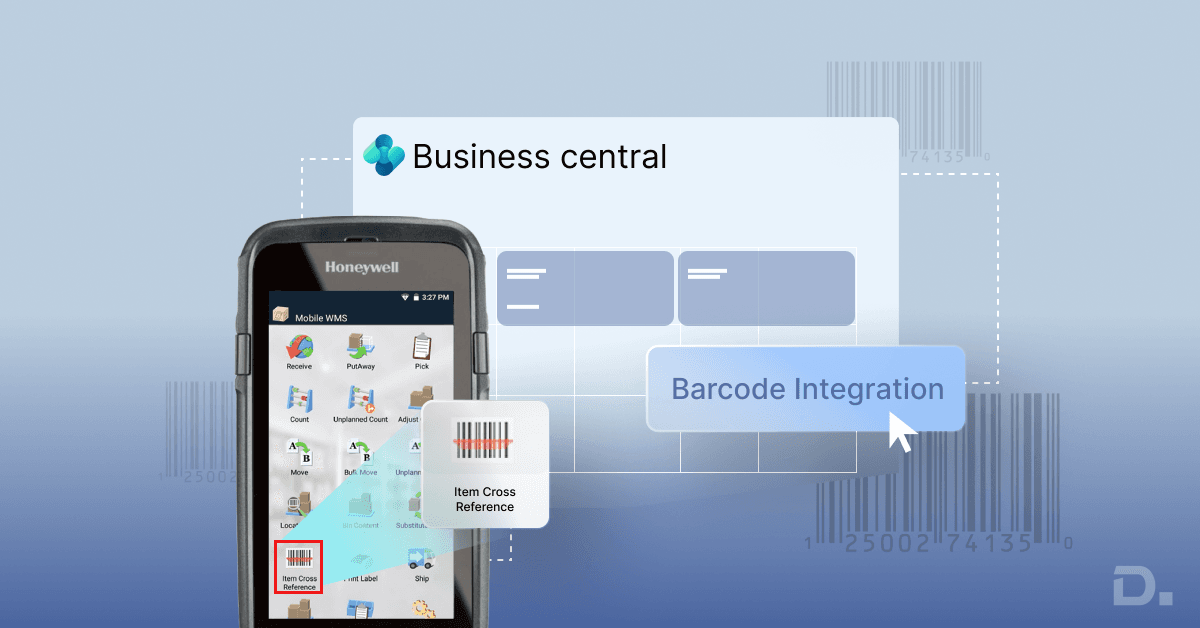
Barcode scanning brings those checks into the warehouse itself. Staff can scan an item, bin, lot or serial number while carrying out the task, with the information passed into Business Central.
Table of Contents
- Key Takeaways
- What is a Warehouse Barcode System?
- How Does a Warehouse Barcode System Work with Business Central?
- Dynamics 365 Business Central Barcode Scanning: What Can You Scan?
- How Does Barcode Scanning Improve Warehouse Management?
- What are the Benefits of Barcode Scanning in Warehouses?
- How Do You Implement Barcode Scanning in a Warehouse?
- Business Central Warehouse Management and Barcode Scanning
- Native Business Central Scanning vs a Mobile Warehouse Management System
- Warehouse Barcode Software: What Should You Look For?
- Continia and Business Central
- How Much Does a Warehouse Barcode System Cost?
- How to Choose the Right Warehouse Barcode System in the UK
- Final Thoughts
- Frequently Asked Questions
For businesses looking at Dynamics 365 Business Central barcode scanning, the real question is not simply whether Business Central can scan a barcode. It is whether its standard functionality fits the way the warehouse receives, stores, picks and moves stock.
Key Takeaways
-
Business Central supports barcode scanning through its mobile app for several inventory and warehouse processes.
-
More structured operations can use Automated Data Capture System (ADCS), extensions or a dedicated mobile warehouse management system.
-
Barcode implementation should start with warehouse processes and item data rather than scanner selection.
-
Item references, units of measure, bins and tracking information need to be set up correctly before scanning becomes part of daily operations.
-
Hardware and exception handling should be tested using real warehouse scenarios before deployment.
What is a Warehouse Barcode System?
A warehouse barcode system links a physical stock movement to the corresponding record in Business Central.
The barcode might identify an item, GTIN, item reference, serial number, lot, package, or warehouse location. What matters is how that information is used in the transaction.
Consider a distributor receiving 40 cartons of electrical components. The purchase order is already in Business Central. The warehouse worker scans the product, records the quantity and, where required, scans the lot number. The goods can then move through the configured receiving and put-away process.
The same approach applies when stock leaves the warehouse. A picker can scan the product or tracking number instead of selecting the value manually.
Business Central's mobile app supports camera-based scanning of 1D and 2D barcodes on iOS and Android devices. It also supports barcode scanning for item references and other inventory information on supported pages.
How Does a Warehouse Barcode System Work with Business Central?
The workflow follows the warehouse transaction rather than operating as a separate process.
For example:
Purchase Order → Receipt → Scan → Put-Away → Bin Confirmation
For outbound stock:
Sales Order → Pick → Scan → Confirm Quantity → Shipment
The scan supplies information to the transaction. Business Central still controls the underlying inventory and warehouse records.
This is important when configuring the solution. Buying a barcode scanner for Business Central does not automatically create a picking or put-away workflow. The location, bins, warehouse documents and item data still need to be configured correctly.
Business Central supports different warehouse configurations, from basic inventory put-away and pick processes through to warehouse receipts, warehouse picks and directed put-away and pick.
Dynamics 365 Business Central Barcode Scanning: What Can You Scan?
Business Central supports scanning in several inventory and warehouse scenarios.
Depending on the page and process, workers can scan:
-
Item references
-
Serial numbers
-
Lot numbers
-
Package numbers
-
GTIN-related item information
For tracked inventory, the Item Tracking Lines page supports scanning serial, lot, and package numbers. Item references can also be scanned from supported pages such as purchase lines, sales lines, and item journal lines.
Example: Lot-Controlled Food Distributor
A food wholesaler receives 300 cases of the same product from two production batches.
The item number identifies the product. The lot number identifies the particular batch.
That distinction matters when the business needs to check stock by batch, trace a shipment, or investigate a quality issue. The warehouse worker can capture the lot number during the transaction instead of recording it separately later.
Business Central's item tracking functionality keeps serial and lot information connected to the relevant inventory transactions.
How Does Barcode Scanning Improve Warehouse Management?
The value becomes clearer when you look at where an error is caught.
Suppose a picker is collecting five products for a customer order. Two have similar descriptions but different item numbers. With a paper-based process, the picker can select the wrong product, and the mistake may only be found during packing.
With scanning, the product becomes a validation point. If the barcode does not match the expected item, the warehouse process can flag the mismatch before the order progresses.
The same applies to bins.
If the worker is instructed to collect stock from bin A-03-02, scanning the bin first provides another check that the worker is in the expected location.
This is where barcode scanning adds value to Business Central's warehouse functionality: it moves the validation closer to the physical stock movement.
What are the Benefits of Barcode Scanning in Warehouses?
Fewer Manual Entry Errors
Scanning removes repeated typing of item numbers and tracking references. This is particularly useful where products have similar descriptions or long item codes.
Faster Receiving
A receiving team handling a large delivery can scan item and tracking information as goods arrive instead of entering every reference manually.
Better Picking Control
A picking mistake becomes more expensive once the goods leave the warehouse. Scanning gives the picker another opportunity to catch the wrong item before packing and dispatch.
Easier Cycle Counting
Workers can scan stock during a cycle count rather than manually recording item references, which is useful for warehouses with large SKU ranges.
Improved Traceability
For serialised and lot-controlled products, scanning captures tracking information at the point of movement, making it easier to follow stock through inbound and outbound transactions.
How Do You Implement Barcode Scanning in a Warehouse?
The implementation should begin with the warehouse process.
1. Map the Physical Workflow
Walk through a normal stock movement and record what workers actually do.
For example:
Receiving → Checking → Put-Away → Replenishment → Picking → Packing → Shipping
Look for points where employees write information down, return to a workstation or enter the same reference more than once.
Those are the areas where mobile scanning is most likely to add value.
2. Review Item and Barcode Data
Barcode scanning exposes gaps in item data quickly.
Review:
-
Item numbers
-
GTINs
-
Item references
-
Units of measure
-
Bin and location codes
-
Serial and lot tracking
-
Supplier barcodes
Business Central supports item references and barcode printing for relevant inventory records, so the information behind the barcode needs to be correct before warehouse staff rely on it.
3. Decide What the Barcode Represents
A barcode could identify:
-
An individual item
-
A carton
-
A pallet
-
A unit of measure
-
A serial number
-
A lot
-
A package
-
A warehouse location
Consider a supplier that labels a carton containing 24 units.
When the worker scans that carton, should Business Central record one carton or 24 units?
That needs to be defined in the item and warehouse setup. The scanner cannot make that decision for you.
4. Configure the Business Central Warehouse Process
Business Central supports different warehouse configurations depending on the complexity of the operation.
A smaller warehouse may use inventory put-aways and picks. A larger operation may use warehouse receipts, warehouse put-aways, warehouse picks and directed put-away and pick.
The configuration should reflect how stock actually moves through the facility.
For example, a single-site distributor with 500 SKUs and a small warehouse team will have different requirements from a business operating several warehouse zones with hundreds of daily picks.
5. Select the Scanning Device
Choose the device after defining the workflow.
Options include:
-
Smartphones
-
Tablets
-
Rugged handheld terminals
-
Dedicated mobile computers with integrated scanners
For occasional scanning, a phone camera may be adequate. Workers scanning continuously throughout an eight-hour shift may be better served by a dedicated handheld.
Test the actual device before committing to a hardware fleet. The warehouse environment, battery life, scanning distance, screen visibility and durability all matter.
6. Test the Exceptions
A warehouse pilot should include more than successful scans.
Test:
-
Damaged labels
-
Incorrect items
-
Missing barcodes
-
Missing lot numbers
-
Incorrect quantities
-
Duplicate scans
-
Supplier barcode differences
-
Loss of network connection
For example, if a worker scans a damaged label and cannot continue, what happens next? If manual entry is the fallback, make sure that process is available and controlled.
7. Train Staff on the Actual Workflow
Training should follow the sequence workers use on the warehouse floor.
For example:
Scan location → Scan item → Confirm quantity → Move stock
Staff should also know what to do when a scan fails or the system identifies a mismatch.
Business Central Warehouse Management and Barcode Scanning
Barcode scanning becomes more useful as the warehouse process becomes more structured.
Suppose a purchase order arrives and the warehouse receipt creates put-away work. The worker needs to move stock from the receiving area into a storage bin.
Business Central can define the warehouse activity and the locations involved. In advanced warehouse configurations, put-away and picking activities use Take and Place lines to identify where stock is taken from and where it should be placed.
Scanning can then be used while the worker performs those actions.
For example:
Scan receiving bin → Scan item → Confirm quantity → Scan destination bin → Register movement
That is more useful than treating barcode scanning as a separate layer sitting on top of Business Central. The scan becomes part of the warehouse transaction itself.
Native Business Central Scanning vs a Mobile Warehouse Management System
Not every warehouse needs another application.
Business Central's mobile app already supports barcode scanning for several inventory and warehouse scenarios. A smaller operation with straightforward processes may have everything it needs within Business Central.
A mobile warehouse management system becomes more relevant when workers need more specialised workflows, such as:
-
Guided picking
-
Complex bin movements
-
High-volume scanning
-
Replenishment
-
Custom validation
-
Dedicated handheld workflows
-
Integration with specialist warehouse hardware
Business Central also provides an Automated Data Capture System (ADCS) framework for connecting handheld devices with Business Central. ADCS can support warehouse movements and certain journal activities, with device-specific connectivity requiring implementation work.
This gives businesses a choice between extending standard Business Central functionality and introducing a broader warehouse solution.
The right option depends on the warehouse process, transaction volume, and level of mobile control required.
Warehouse Barcode Software: What Should You Look For?
When comparing warehouse barcode software, ask the supplier to demonstrate your actual warehouse process.
Business Central Integration
The solution should work with your Business Central inventory and warehouse records rather than creating a separate stock database that needs regular reconciliation.
Item and Tracking Support
If you use serial numbers, lots, or packages, test those transactions during the demonstration.
A simple item scan does not tell you how well the solution handles tracked inventory.
Bin-Level Operations
If your warehouse uses multiple bins, ask the supplier to demonstrate a complete put-away and pick.
The useful test is:
Find the right stock → Scan it → Move it → Confirm the destination → Update Business Central
Hardware
Use the actual device you intend to deploy during testing.
Consider gloves, battery life, screen visibility, scanning distance, durability, and how quickly workers can operate the device.
Connectivity
Find out what happens when the warehouse loses Wi-Fi.
Can the worker continue? Are transactions held? Does the system require the transaction to be repeated after reconnecting?
The answer should be clear before rollout.
Exception Handling
Ask the supplier to demonstrate an incorrect scan, missing barcode, and unavailable stock.
A warehouse worker should know what to do next without leaving the work area to find an administrator.
Continia and Business Central
Continia can sit alongside a Business Central warehouse solution where document or finance automation is also required.
It should be evaluated separately from the barcode scanning layer, which needs to match the warehouse's specific workflows and device requirements.
How Much Does a Warehouse Barcode System Cost?
For a UK Business Central setup, a basic warehouse scanning implementation may start around £3,500–£6,000, before considering the full cost of hardware, licences and additional development.
As a current market example, Quick Dynamics advertises a £3,500 Quick Start Warehouse Scanning package for Business Central, based on Warehouse Insight.
More advanced WMS or multi-site projects can move into the £10,000–£15,000+ range depending on the number of locations, devices, integrations and custom workflows.
These figures are rough implementation indicators rather than fixed market prices. Hardware, licences, configuration, training and ongoing support may be charged separately.
How to Choose the Right Warehouse Barcode System in the UK
For businesses looking for a warehouse management system UK solution that works with Business Central, start by identifying what standard functionality already covers.
Then document the gaps.
| Area | Questions to Ask |
|---|---|
| Inventory | What needs to be scanned? |
| Item Data | Are GTINs, references, and units of measure correct? |
| Tracking | Do you use serial, lot, or package numbers? |
| Warehouse | How many locations, zones, and bins are involved? |
| Picking | Does the process require guided picking? |
| Receiving | How are deliveries checked and recorded? |
| Hardware | What device will workers use throughout the shift? |
| Connectivity | What happens if the network drops? |
| Integration | How does the scan update Business Central? |
| Exceptions | What happens when the barcode or quantity is wrong? |
| Scale | Will the setup support future sites and volumes? |
The best solution is not necessarily the one with the most features. It is the one that gives warehouse staff a clear process and keeps physical stock movements aligned with Business Central.
Final Thoughts
Barcode scanning works best when it follows the way your warehouse already operates. Business Central provides a solid starting point for scanning items and tracking information, while more complex operations may need additional mobile functionality or ADCS.
Get the basics right first: item data, units of measure, bins, warehouse processes, and the devices used by your staff. Once those are aligned, scanning becomes part of the warehouse workflow rather than another system for employees to manage.
Looking to integrate barcode scanning with Business Central? Contact Dynamics Square to discuss your warehouse requirements and implementation options.
Frequently Asked Questions
Business Central's mobile app supports 1D and 2D barcode scanning for supported inventory and warehouse fields. More advanced operations can use ADCS or additional warehouse functionality.
Yes. The mobile app can scan supported 1D and 2D barcodes, including item references and other supported inventory information.
Yes. Business Central supports scanning alongside its inventory and warehouse processes. More complex warehouse requirements may call for ADCS or an extension.
The Business Central mobile app can use compatible iOS and Android devices for camera-based scanning. Dedicated hardware should be tested against the intended warehouse workflow before purchase.
It reduces manual entry and gives warehouse staff a way to validate items, locations and tracking information during the physical transaction.
Barcodes can identify items, locations, lots, serial numbers or packages. Workers scan them during receiving, put-away, picking, movement and counting, with the connected Business Central process recording the transaction.
Barcodes are normally scanned using a camera or optical scanner, while RFID uses radio frequency to identify tagged items. RFID is more useful where multiple tagged items need to be identified without individually scanning each label.
A basic Business Central warehouse scanning implementation may start around £3,500–£6,000, while more complex WMS projects can cost considerably more. Hardware, licences, development and support may sit outside the implementation fee.
Focus on Business Central integration, item and tracking support, warehouse workflows, hardware, connectivity and exception handling. Test the solution against real receiving, put-away and picking scenarios before deployment.