.jpg&w=3840&q=75&dpl=dpl_BmTcRbuQWaqryfkWHP9yeSuVw4id)
Accounts payable isn't exactly the part of finance that gets people excited. It is a repetitive, time-consuming, and frustrating task. Processing invoices manually can lead to bottleneck. On top of that missing details and approvers busy schedules can be challenging.
One invoice arrives as a PDF. Another comes through email. Someone enters the data manually. Someone else checks it. Then it sits waiting for approval. Days pass. Sometimes weeks. Eventually it gets paid.
Table of Contents
Now imagine handling hundreds or thousands of invoices every month.
That traditional process starts to break down pretty quickly.
Microsoft recognised this challenge. It is one of the reasons the company has been investing heavily in AI across its business applications. Business Central Payables Agent is one of the latest examples of an intelligent assistant. This modern solution has been designed to automate large parts of the accounts payable process inside Dynamics 365 Business Central.
And it's not just another automation tool.
The Microsoft Payables Agent uses AI to analyse invoices, extract data, validate information, identify exceptions, and help finance teams process supplier invoices far more efficiently than traditional methods allow.
For organisations already using Business Central, it's a glimpse into what modern finance operations can look like.
Less manual work. Fewer errors. Faster processing.
That's the promise.
But what exactly does the Payables Agent do? How does it work? What's involved in setting it up? And is the investment worthwhile?
Let's explore everything you need to know.
What Is the Business Central Payables Agent?
The Business Central Payables Agent is an AI-powered accounts payable assistant built into Microsoft Dynamics 365 Business Central.
Its primary purpose is simple.
Reduce the amount of manual effort involved in processing supplier invoices.
Instead of finance teams spending hours entering invoice details, matching records, and moving documents through approval workflows, the Payables Agent handles much of that work automatically.
Think of it as a digital member of your finance department.
Not a replacement for your team. More like an extra pair of highly efficient hands that never gets tired of processing invoices.
The agent reviews incoming invoices, extracts key information, compares that information against records already stored in Business Central, identifies potential issues, and prepares transactions for approval.
The human team remains in control.
The AI handles the repetitive tasks.
That's a much better use of everyone's time.
Microsoft Payables Agent vs Traditional Invoice Processing
Let's compare the two approaches.
|
Traditional Processing |
Microsoft Payables Agent |
|
Manual invoice entry |
Automated extraction |
|
Human invoice routing |
Automated workflows |
|
Higher error rates |
Improved accuracy |
|
Slow processing times |
Faster processing |
|
Labour-intensive matching |
AI-assisted matching |
|
Limited scalability |
Easily scalable |
The difference becomes especially noticeable in organisations processing hundreds or thousands of invoices every month.
Why Accounts Payable Needed an AI Upgrade?
For years, accounts payable teams have faced the same problem.
Invoice volumes keep increasing.
Headcounts don't.
Businesses grow. Supplier networks expand. Transaction volumes rise. Yet many organisations continue relying on processes that haven't changed much in decades.
A typical invoice journey often looks something like this:
An invoice arrives. Invoice is opened and the accounts executive enters the data manually. Then the data is reviewed and matched against the corresponding purchase order before being routed for approval.
In case approval takes time, the executive gets the follow-up to keep the invoice process moving. Now, you can gauge the issue easily. A process that relies heavily on manual effort creates inefficiencies, delays, and areas of errors.
Every stage introduces delays. Every manual touchpoint creates opportunities for mistakes.
The Payables Agent Business Central solution was designed to tackle exactly these inefficiencies.
By introducing AI into the process, Microsoft aims to remove much of the repetitive administrative work that slows finance departments down.
And frankly, it's long overdue.
How the Business Central Payables Agent Works?
On the surface, the process feels remarkably simple.
Behind the scenes, there's a lot happening.
When an invoice enters the system, the Payables Agent immediately begins analysing the document. It identifies relevant fields, extracts key details, compares information against existing records, and determines how the invoice should move through the workflow.
Most of this happens automatically.
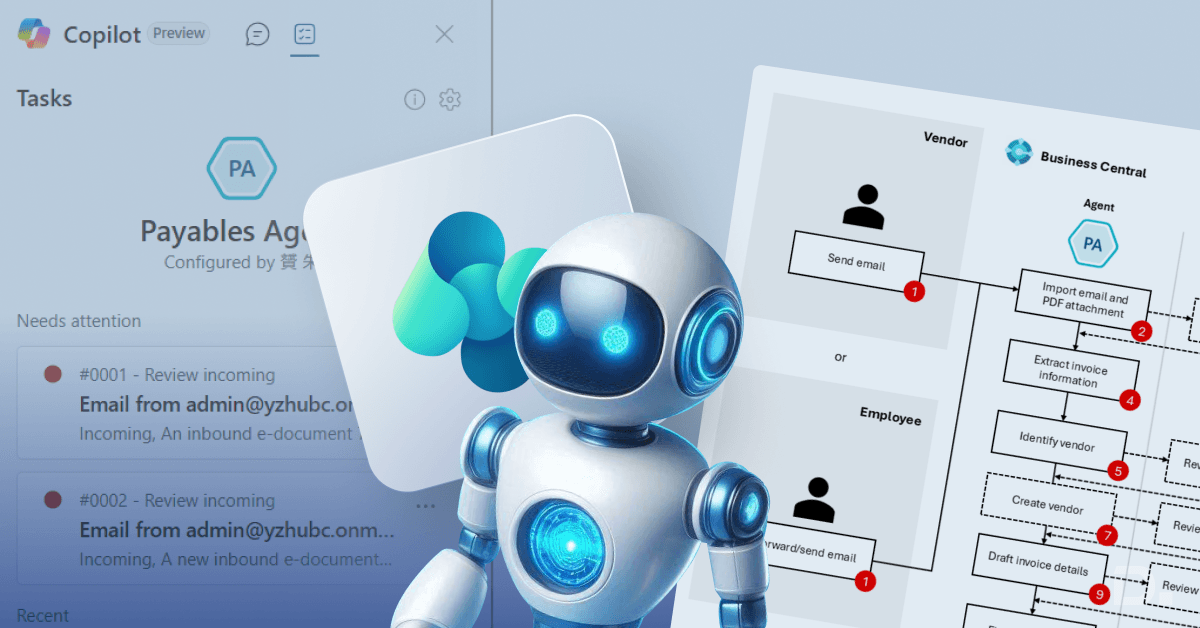
A simplified workflow might look like this:
- Invoice is received
- AI reads and interprets the document
- Supplier details are identified
- Invoice information is extracted
- Matching checks are performed
- Approval routing is triggered
- Exceptions are flagged for review
- Invoice progresses towards posting and payment
The important thing here is speed.
Tasks that once required several people and multiple manual steps can often be completed within minutes.
Sometimes even faster.
Key Features of the Payables Agent
Let's look at the Key Features of the Payables Agent in more detail because this is where much of the value becomes obvious.
Intelligent Invoice Capture
Nobody enjoys manually entering invoice data.
The agent automatically extracts information directly from incoming invoices, including:
- Supplier details
- Invoice numbers
- Invoice dates
- Due dates
- Tax values
- Invoice totals
- Line-item information
What previously required manual typing becomes largely automated.
That's not just faster.
It's usually more accurate too.
AI-Powered Invoice Understanding
Traditional invoice automation tools often rely on fixed templates.
The problem?
Suppliers don't all use the same format.
Not even close.
Some invoices are simple. Others are cluttered. Some contain dozens of line items. Others barely fill half a page.
The Business Central Payables Agent uses artificial intelligence to understand invoice content rather than relying solely on rigid formatting rules.
That flexibility makes a significant difference in real-world scenarios.
Automated Supplier Recognition
Finance teams often waste time matching invoices to the correct supplier records.
The agent can identify vendors automatically and associate invoices with existing records in Business Central.
It's a small feature on paper.
In practice, it saves an enormous amount of time.
Purchase Order Matching
Matching invoices against purchase orders can become a major bottleneck, especially in organisations with high transaction volumes.
The agent helps by automatically comparing invoices against:
- Purchase orders
- Goods receipts
- Vendor records
- Historical transaction data
If everything matches, processing continues.
If something doesn't look right, the system raises a flag.
Simple.
Effective.
Exactly what finance teams need.
Approval Workflow Automation
Approvals often create delays.
An invoice might be processed quickly but then sit in someone's inbox for three days waiting for authorisation.
The Payables Agent helps automate workflow routing by:
- Sending approval requests
- Tracking approval status
- Escalating overdue approvals
- Recording audit information
The process becomes more transparent and considerably more efficient.
Exception Detection
Here's where AI becomes particularly valuable.
Not every invoice should pass through automatically.
Some require investigation.
The system can identify potential issues such as:
- Duplicate invoices
- Missing purchase orders
- Incorrect amounts
- Supplier mismatches
- Unusual transaction patterns
Rather than reviewing every invoice manually, finance teams can focus their attention on the exceptions that genuinely need human judgement.
That's a smarter approach.
Seamless Business Central Integration
One of the strongest selling points is that the solution works directly inside Business Central.
There's no jumping between systems.
No complicated third-party integrations.
No disconnected workflows.
Everything happens within the familiar Business Central environment.
For many organisations, that simplicity is incredibly appealing.
Setting Up the Payables Agent Business Central Environment
The setup process isn't particularly complex, but there are a few important steps involved.
Rushing through them isn't a great idea.
A little preparation goes a long way.
Review Licensing Requirements
Before anything else, businesses should confirm they have access to the relevant Payables Agent functionality.
Microsoft regularly updates licensing models and AI offerings, so checking current eligibility is essential.
Enable AI Features
The next step involves activating the necessary AI capabilities within Business Central.
Depending on the environment, this may involve:
- Copilot settings
- AI service activation
- Administrative permissions
- Security configuration
Without these foundations, the agent can't function properly.
Clean Up Vendor Data
This step often gets overlooked.
It shouldn't.
AI performs best when the underlying data is accurate.
Duplicate suppliers. Outdated records. Inconsistent naming conventions.
All of these can reduce automation accuracy.
A quick data clean-up before implementation can make a surprisingly large difference.
Configure Approval Workflows
Automation only works effectively when clear business rules exist.
Before deployment, organisations should define:
- Approval thresholds
- Department routing rules
- Escalation procedures
- Exception handling policies
Clear workflows lead to better outcomes.
Almost every time.
Run a Pilot Programme
Rolling out automation across the entire finance function on day one isn't always the best idea.
Testing first allows teams to:
- Measure extraction accuracy
- Validate workflows
- Identify process gaps
- Build user confidence
Small pilot projects often lead to smoother long-term adoption.
Train Finance Users
Even the smartest AI still requires people.
Finance teams should understand:
- How invoices are processed
- How exceptions are handled
- How approvals work
- When manual intervention is required
Good training accelerates adoption and improves results.
Benefits of Using the Payables Agent
Now for the part most organisations care about.
The actual business impact.
The Benefits of Using the Payables Agent extend well beyond simple time savings.
Less Manual Data Entry
Let's start with the obvious one.
Data entry decreases dramatically.
Instead of typing invoice information manually, employees review information already extracted by the AI.
That alone can save countless hours each month.
Faster Invoice Processing
Speed matters.
Especially when supplier relationships are involved.
Invoices move through the process much faster when AI handles extraction, validation, matching, and routing.
Approvals happen sooner.
Payments happen sooner.
Everyone benefits.
Improved Accuracy
Humans make mistakes.
That's normal.
Invoice numbers get entered incorrectly. Suppliers are selected accidentally. Decimal points end up in the wrong place.
Automation helps reduce these common errors.
The result is cleaner financial data and fewer corrections later.
Better Compliance and Audit Readiness
Compliance isn't glamorous.
It's still important.
The Payables Agent creates more consistent workflows and stronger audit trails, making it easier for organisations to demonstrate control over financial processes.
For regulated industries, that's particularly valuable.
Greater Visibility
Many finance leaders struggle to answer simple questions like:
Where is this invoice?
Who needs to approve it?
Why hasn't it been processed?
Automation provides much clearer visibility into invoice status and workflow progress.
No more guesswork.
Easier Scaling
As businesses grow, invoice volumes increase.
Traditionally, that meant hiring more people.
AI changes the equation.
The Payables Agent Business Central solution allows organisations to process larger volumes without expanding administrative teams at the same rate.
That's a significant advantage.
More Strategic Finance Teams
This might be the most important benefit of all.
When employees spend less time entering data, they can spend more time doing meaningful work. They can focus on financial analysis, cash management, budget forecasting, vendor negotiations, and business planning.
These are the kind of work that actually drives value.
Business Central Payables Agent Cost
Let's address the question nearly everyone asks.
What is the Business Central Payables Agent Cost?
The answer depends on several factors.
Microsoft's pricing can vary based on:
- Licensing plans
- AI consumption levels
- Business Central subscriptions
- Regional availability
- Feature access requirements
Because Microsoft's AI offerings continue evolving, pricing structures may change over time.
For that reason, organisations should always review the latest Microsoft licensing information or speak directly with a Microsoft partner before making budget decisions.
That said, focusing purely on subscription costs can be misleading.
The real calculation should include potential savings from:
- Reduced administrative effort
- Lower processing costs
- Fewer invoice errors
- Faster approvals
- Increased productivity
In many cases, those savings quickly outweigh the technology investment.
Is the Microsoft Payables Agent Worth It?
For organisations processing a handful of invoices each month, perhaps not.
For businesses managing hundreds or thousands?
The conversation changes completely.
The Microsoft Payables Agent addresses some of the most persistent challenges in accounts payable. It reduces manual effort, improves consistency, accelerates workflows, and helps finance teams focus on higher-value activities.
And that's really the bigger story here.
The technology isn't just about processing invoices faster.
It's about changing how finance departments operate.
Less administration.
More insight.
Less repetition.
More value.
Ready to Modernise Accounts Payable with AI?
Accounts payable has never been known for speed.
Invoices arrive from multiple sources. Data gets entered manually. Approvals get delayed. Errors creep in. Finance teams spend valuable hours on repetitive tasks that add little strategic value.
Over time, these inefficiencies don't just slow down invoice processing. They impact cash flow visibility, supplier relationships, operational costs, and overall business performance.
The Business Central Payables Agent changes that.
By combining AI-powered invoice capture, intelligent data extraction, automated matching, exception detection, and streamlined approval workflows, it helps organisations process invoices faster, improve accuracy, and reduce the administrative burden placed on finance teams.
But unlocking the full value of AI-driven automation requires more than simply switching on a new feature.
It requires the right implementation approach. Clean data. Well-defined workflows. Proper user adoption. And a partner that understands both the technology and the finance processes behind it.
That's where Dynamics Square UK comes in.
As one of the UK's leading Microsoft Dynamics 365 partners, Dynamics Square UK has helped hundreds of organisations streamline operations, modernise finance functions, and accelerate digital transformation through Microsoft Business Applications.
Our team of Microsoft-certified consultants, solution architects, and industry experts brings years of hands-on experience delivering successful Dynamics 365 Business Central implementations, upgrades, integrations, and AI-led automation projects.
We don't believe in one-size-fits-all solutions.
Every organisation processes invoices differently. Every finance team faces unique challenges. That's why we take the time to understand your existing processes, identify automation opportunities, and design a solution that delivers measurable business results.
Whether you're looking to automate invoice processing, reduce approval bottlenecks, improve financial controls, or maximise your Business Central investment, our experts are ready to help.
From initial assessment and deployment to optimisation and long-term support, Dynamics Square UK provides end-to-end guidance to ensure your Payables Agent implementation delivers lasting value.
The future of accounts payable is intelligent, automated, and significantly more efficient.
Now is the perfect time to get ahead.
Speak with Dynamics Square UK's Business Central specialists today to explore the Business Central Payables Agent, request a personalised demo, and discover how AI can help your finance team work smarter, process faster, and focus on what truly drives business growth.
If you need any help, don't hesitate to reach out to us. You can give us a call at + 44 203 769 7689 or send us an email at info@dynamicssquare.co.uk.