Microsoft Dynamics 365 EDI Integration: Benefits, Process and Implementation Guide

Businesses that exchange large volumes of orders, invoices, shipping documents and product information with customers and suppliers often rely on manual processes. These processes can create data entry errors, delays and difficulties maintaining accurate business records.
Microsoft Dynamics 365 EDI integration helps businesses automate electronic document exchange between their ERP systems and external trading partners. It connects Dynamics 365 with customers, suppliers, retailers, warehouses and logistics providers, making business transactions faster and more reliable.
Table of Contents
For UK manufacturers, wholesalers, distributors and retailers, EDI integration can improve supply chain visibility, reduce administrative work and streamline order processing.
In this guide, we explore how Dynamics 365 EDI integration works, its key benefits, common EDI document types and important implementation considerations.
What Is Microsoft Dynamics 365 EDI Integration?
Electronic Data Interchange (EDI) is the electronic exchange of standardised business documents between organisations without requiring manual data entry.
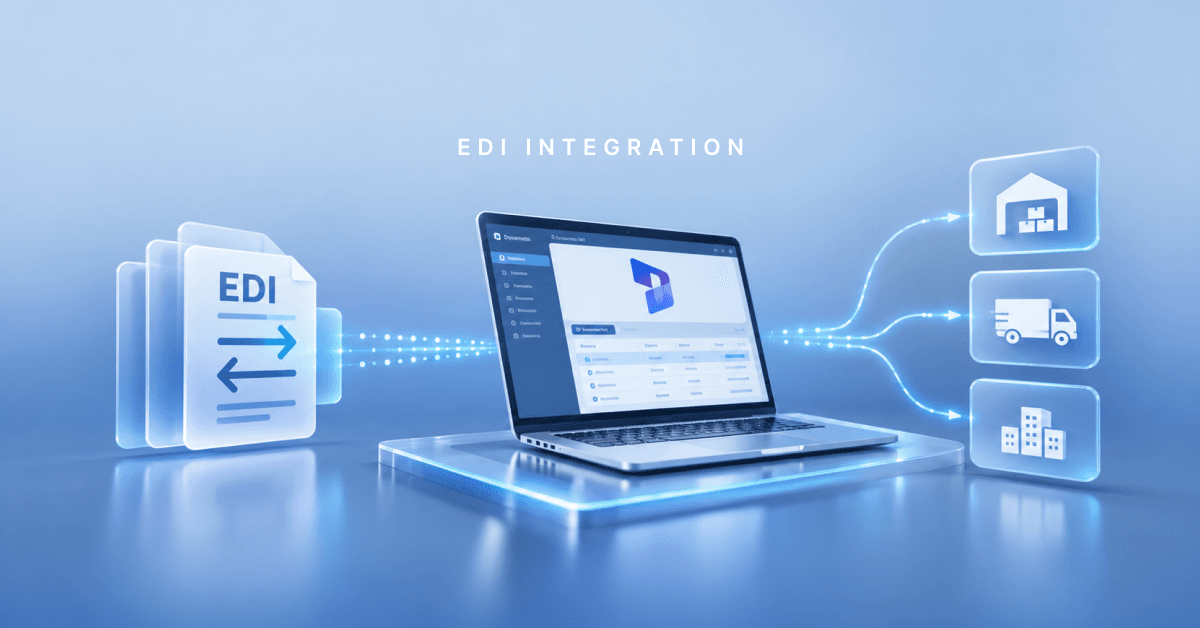
Microsoft Dynamics 365 EDI integration connects an ERP system with an EDI platform to exchange business information automatically.
For example, when a retailer sends a purchase order, the EDI solution can receive and translate the document before transferring the relevant information into Dynamics 365. The ERP system can then process the order and send the required confirmation or shipping information back through the EDI platform.
Common documents exchanged through EDI include:
Purchase orders
Sales orders
Order confirmations
Advance shipping notices
Sales invoices
Credit notes
Inventory updates
Product catalogue information
This integration helps businesses maintain consistent information across their internal systems and external trading partners.
How Does Dynamics 365 EDI Integration Work?
Dynamics 365 EDI integration typically involves an ERP system, an EDI platform and an external trading partner.
The process generally follows these steps:
1. Receive EDI documents
A customer, supplier or trading partner sends an electronic document through an agreed communication channel, such as AS2, SFTP or a value-added network (VAN).
2. Translate and validate data
The EDI platform converts the incoming document into a format that the receiving business system can process. It also validates the information against agreed trading partner requirements.
3. Transfer information to Dynamics 365
The integration transfers relevant information into Dynamics 365 Business Central, Finance or Supply Chain Management using APIs, connectors or other integration methods.
4. Process business transactions
Dynamics 365 processes the information according to the configured business workflows. For example, an incoming purchase order can create a sales order for further processing.
5. Send responses to trading partners
After processing, the EDI solution can generate and transmit order acknowledgements, shipping notices and invoices in the required format.
This automated workflow reduces manual intervention and helps businesses maintain more accurate transaction records.
Common EDI Document Types Used with Dynamics 365
Different industries use specific EDI standards and transaction sets depending on their trading partner requirements.
Some commonly used examples include:
EDI 850: Purchase Order – communicates purchasing requirements to suppliers.
EDI 855: Purchase Order Acknowledgement – confirms whether an order has been accepted or requires changes.
EDI 856: Advance Ship Notice – provides shipment details before goods arrive.
EDI 810: Invoice – communicates billing information to customers.
EDIFACT ORDERS: Purchase order document used for electronic ordering.
EDIFACT INVOIC: Electronic invoice exchanged between trading partners.
EDIFACT DESADV: Despatch advice containing shipment information.
The required document formats depend on the industry, country and individual trading partner specifications.
Key Benefits of Microsoft Dynamics 365 EDI Integration
Integrating EDI with Dynamics 365 can deliver several operational benefits.
1. Automates order processing
EDI integration reduces manual order entry by transferring purchase orders and sales information directly into the ERP system.
2. Reduces data entry errors
Automated document translation and validation help minimise errors caused by manual processing and inconsistent information.
3. Improves supply chain visibility
Businesses can track orders, shipment information and invoices more effectively across their trading partner network.
4. Speeds up invoice processing
Electronic invoice exchange reduces paperwork and helps finance teams process transactions more efficiently.
5. Improves customer and supplier relationships
Faster document exchange, accurate order information and timely updates help businesses maintain better relationships with trading partners.
6. Supports business growth
As transaction volumes increase, automated EDI processes can help businesses manage additional orders and trading partners without relying entirely on manual administration.
Which Dynamics 365 Applications Can Integrate with EDI?
EDI integration can support different Microsoft Dynamics 365 applications depending on business requirements.
Dynamics 365 Business Central: Suitable for small and medium-sized businesses looking to automate sales orders, purchase orders, invoices and supplier transactions.
Dynamics 365 Finance: Supports financial and operational processes that require electronic exchange of business and financial documents.
Dynamics 365 Supply Chain Management: Helps manufacturing, distribution and logistics businesses connect procurement, inventory, warehouse and shipping processes with external trading partners.
The integration architecture and EDI solution should be selected according to the Dynamics 365 application, document volumes and trading partner requirements.
What Should Businesses Consider Before Implementing Dynamics 365 EDI Integration?
A successful EDI implementation requires more than connecting two systems. Businesses should consider the following factors:
Trading partner requirements: Identify the EDI standards, document formats and communication protocols required by customers and suppliers.
Data mapping: Ensure information from EDI documents maps correctly to Dynamics 365 fields.
Integration method: Select suitable APIs, connectors or middleware for reliable data exchange.
Error handling: Establish processes for identifying, correcting and resubmitting failed transactions.
Security: Use appropriate authentication, encryption and access controls to protect business information.
Scalability: Choose an integration solution that can support additional trading partners and higher transaction volumes.
Proper planning helps reduce integration problems and supports reliable document exchange.
How Can Dynamics Square UK Help with Dynamics 365 EDI Integration?
Choosing the right integration approach is essential for businesses looking to connect Microsoft Dynamics 365 with external trading partners.
Dynamics Square helps businesses plan and implement Microsoft Dynamics 365 solutions that support their operational and integration requirements.
Its services include Dynamics 365 implementation, system integration, customisation, data migration and ongoing support. Businesses can get assistance in identifying suitable integration approaches for connecting ERP systems with external applications and trading partner networks.
Whether you use Business Central, Finance or Supply Chain Management, the right integration strategy can help streamline business transactions and improve operational efficiency.
Final Thoughts
Microsoft Dynamics 365 EDI integration helps businesses automate document exchange, improve order accuracy and streamline communication with customers, suppliers and logistics partners.
For UK businesses managing complex supply chains or high transaction volumes, integrating EDI with Dynamics 365 can improve operational efficiency and support business growth.
If you want to connect your ERP system with customers, suppliers or trading partners, Contact Dynamics Square UK to discuss your Microsoft Dynamics 365 integration requirements and implementation options.
Frequently Asked Questions
Microsoft Dynamics 365 EDI integration connects an ERP system with an EDI platform to automate the exchange of business documents, including purchase orders, invoices, order confirmations and shipping notices.
Yes. Business Central provides APIs, integration capabilities and an e-document framework. However, complete trading-partner EDI functionality, including document translation and partner-specific mapping, generally requires an external EDI solution or suitable connector.
Common formats include ANSI X12 and UN/EDIFACT. The exact formats depend on the selected EDI provider, integration solution and trading partner requirements.
Yes. With the appropriate EDI integration, businesses can automatically receive purchase orders, process sales transactions, exchange order confirmations and send electronic invoices.
Implementation time depends on the number of trading partners, document types, data mapping requirements, integrations and testing. A straightforward integration may take less time than a complex project involving multiple trading partners.
Yes. Dynamics Square UK provides Microsoft Dynamics 365 implementation, integration, customisation, migration and support services. Its team can help businesses assess their integration requirements and identify suitable solutions.