
- 500+ clients worldwide
- 150+ certified professionals
- Delivering Dynamics 365 since 2011
 Microsoft Solutions Partner
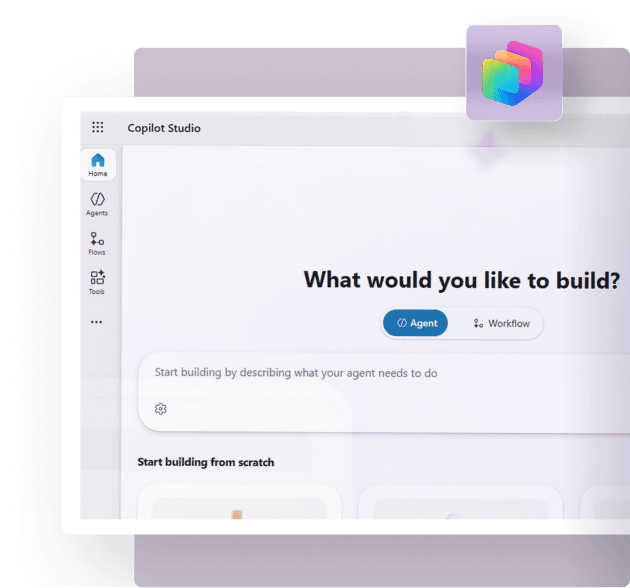
Copilot Studio is Microsoft's low-code platform for building, publishing and managing AI agents and workflows. Describe the agent you want in everyday language or build it in the graphical designer, then connect it to your knowledge sources and business systems. Once tested, you publish it where your users already work, including Teams, Microsoft 365 Copilot, your website and mobile apps.
Copilot Studio brings agents, workflows and agent flows into one studio, so a single team can design a complete business solution and manage it in one place. Microsoft has folded Power Virtual Agents into Copilot Studio, so teams with chatbot experience keep their skills and gain new tools for building and coordinating agents.
A Copilot Studio partner turns that platform into working agents. Dynamics Square scopes the right use cases, builds and connects the agents, selects the licensing route and stays with you after go-live.
Why UK Organisation are Adopting Copilot Studio

Proven at scale.
Microsoft states that 90% of the Fortune 500 use Copilot Studio.

A UK reference point.
Virgin Money built an AI assistant with Copilot Studio and, according to Microsoft's customer story, recorded a 97% journey completion rate and 54% customer engagement on outbound messages.

Speed from idea to agent.
Microsoft reports that Amgen built an R&D agent in six weeks with Copilot Studio, and that Dow identified more than 100 use cases for agents.

A widening model choice.
Microsoft has announced GPT-5 and Anthropic models within the Copilot Studio multi-model lineup.
Copilot Studio Agents: What You Can Build
Copilot Studio agents are AI systems that carry out business work for an individual, a team or a whole company. Microsoft groups them by how much independence they carry.
| Agent type | What it does | Where it fits |
|---|---|---|
| Answering agents | Retrieve and summarise information from connected knowledge | Staff helpdesks, policy queries, customer FAQs |
| Action agents | Carry out tasks by calling flows, prompts and APIs linked to your systems | Ticket creation, approvals, record updates |
| Autonomous agents | Plan, learn and escalate work items with minimal supervision | Order handling, reconciliations, screening |
| Multi-agent systems | Route work to the right specialist agent, from Microsoft or partner providers | Complex, cross-department processes |
| Voice agents | Handle phone-based conversations powered by generative AI | Contact centre front line |
Choose the Engine Behind the Agent
Everything built in Copilot Studio runs on a harness, which shapes how the agent reasons, what it can handle and how it is billed.

GitHub Copilot harness
Agents that reason through multi-step tasks and complex processes

Standard harness
Predictable agents that follow defined topics and repeatable conversation paths

Copilot chat harness
Grounding Microsoft 365 Copilot Chat answers in your own company content
Copilot Studio Capabilities We Configure for Your Business
Create
- Natural-language authoring, so a business owner can describe an agent and refine it through conversation
- Pre-built agents from the Agent Store and templates to customise
- Structured instructions that keep responses consistent and accurate
- Multi-agent orchestration for complex processes
Connect
- More than 1,400 external connectors
- Model Context Protocol (MCP) servers
- Work IQ, the layer that gives Microsoft 365 Copilot and agents context about your role and company
- Flows, prompts and APIs that let an agent act in your business systems
Deploy
- Publishing to Microsoft Teams, SharePoint and Microsoft 365 Copilot
- Publishing to websites, apps and social channels for customers
- Voice and phone agents
Govern
- Dedicated development environments and agent lifecycle controls
- Agent spends oversight in the Power Platform admin centre
- Usage and ROI tracking through Microsoft Purview, the Power Platform admin centre and Viva Insights
Copilot Studio Use Cases by Department
Microsoft's own use case library gives a clear map of where agents earn their place first.
| Department | Agent | What it does |
|---|---|---|
| Finance | Balance sheet reconciliation agent | Detects variances and automates corrections |
| Human resources | Recruitment assistant agent | Screens candidates and highlights the best matches |
| Customer service | Cross-sell and upsell agent | Spots customer preferences and recommends offers |
| IT | IT support agent | Automates ticket intake, creation, triage and communication |
| Legal | Contract review agent | Detects risks and deviations, then recommends changes |
Dynamics Square builds these around the systems your teams already run. Every agent design starts from the process, then records four things: the Dynamics 365 or Business Central data the agent reads, the actions it may take, the person who approves changes and the Copilot Credit cost of each interaction.
| Where the process runs | How the agent connects | What Microsoft states |
|---|---|---|
| Dynamics 365 CRM apps (Sales and Service) | Work IQ MCP, which Copilot Studio agents can use to reach Dynamics 365 business data | Agents carry out governed actions such as reassigning ownership, escalating issues and updating records within user permissions, presenting proposed changes and following any required approval before source records update |
| Dynamics 365 Finance and Operations | Work IQ coverage for Finance and Operations apps | Microsoft has announced Work IQ coverage for its Finance and Operations apps, and Dynamics Square confirms availability for your tenant during scoping |
| Business Central | Connectors, flows and APIs that we configure and test with you | Copilot ships in the product with the Business Central licence for online customers, and Microsoft's release plan describes a Payables Agent that reads invoices, matches vendors and accounts, and prepares invoices for approval with human oversight |
| Other line-of-business systems | Any of the 1,400+ external connectors, plus MCP servers | Work IQ also covers third-party line-of-business applications |
The result is an agent that answers from your own records and acts inside your processes, with approvals wherever your policies require them.
Copilot Studio Pricing in the UK
Copilot Studio pricing follows a credit model. Every response or action an agent completes consumes Copilot Credits, and the number of credits depends on the complexity of the task. Microsoft's published UK prices are shown below as of 2026.
| Route | UK price | Billing |
|---|---|---|
| Microsoft 365 Copilot | From £23.10 per user per month, paid yearly, excluding VAT | Includes Copilot Chat and the Standard harness in Copilot Studio for internal agents |
| Copilot Studio capacity pack | £153.80 per pack per month, 25,000 Copilot Credits each | Tenant-wide, paid up front |
| Pay-as-you-go | Charged for the credits consumed | Billed at month end through an Azure subscription, with usage-based charges only |
| Pre-purchase plan | Save up to 20% on prepaid Copilot Credit Commit Units | One-year prepaid pool, bought through Azure, with automatic pay-as-you-go cover if credits run out |
Capacity packs and pay-as-you-go deliver the same product features. Only the way you pay differs. Pay-as-you-go and the pre-purchase plan both need an active Azure subscription.
How Copilot Credits are Consumed?
| Agent activity | Copilot Credits |
|---|---|
| Classic answer (predefined response) | 1 |
| Generative answer | 2 |
| Agent action | 5 |
| Tenant graph grounding | 10 |
| Agent flow actions, per 100 actions | 13 |
These rates apply to agents on the standard harness. Reasoning models add a premium charge of 10 Copilot Credits per 1,000 tokens on top of the feature rate. Voice agents are billed per minute, at 10, 35 or 75 credits depending on the voice tier.
Worked Example for Better Understanding
Microsoft's own customer support example describes an agent that gives four classic answers and two generative answers per conversation for 900 customers a day: (4 x 1 + 2 x 2) x 900 = 7,200 Copilot Credits per day.
Dynamics Square arithmetic on that example: over a 30-day month the agent consumes 216,000 credits, which equals 8.64 packs. Rounded up to nine whole packs, capacity costs £1,384.20 per month at the published pack price. An internal order processing agent from the same Microsoft guidance uses four agent actions per order, so each order consumes 20 credits.
Guardrails That Protect Your Budget
- Unused Copilot Credits expire at the end of each month.
- When consumption reaches 125% of prepaid capacity, custom agents are disabled until capacity is increased or reset. Conversations already in progress finish normally.
- You can cap credit use for individual agents in the Power Platform admin centre before enforcement applies.
- Microsoft provides an agent usage estimator to forecast credit volumes from your planned agent design and expected traffic.
Dynamics Square builds the credit forecast into every project, so you see the likely running cost of each agent before you commit.
Copilot Studio License: Which Route Fits Your Business
The right Copilot Studio licence depends on who uses your agents and where they run.
Choose Microsoft 365 Copilot when
- Your agents serve employees inside Microsoft 365
- Your users already hold, or will hold, Microsoft 365 Copilot licences
- Copilot Chat and the Standard harness meet your needs
- You want agent building included in your Microsoft 365 Copilot licence
Choose standalone Copilot Studio when
- Your agents serve customers on websites, apps or social platforms
- Your agents serve people outside your licensed base
- You want the GitHub Copilot harness for demanding reasoning tasks
- You want to choose between capacity packs, pay-as-you-go and pre-purchase
Microsoft's licensing rules add a few points worth planning around:
- Microsoft 365 Copilot requires an eligible Microsoft 365 business or enterprise plan.
- Employee-facing use of agents in Copilot Chat, Teams or SharePoint by Microsoft 365 Copilot licensed users carries zero-rated charges for classic answers, generative answers and tenant graph grounding, subject to fair usage limits.
- Computer-Using Agent usage sits outside the Microsoft 365 Copilot inclusion.
- Makers need a Copilot Studio user licence, which is free of charge and assigned by an administrator once a tenant capacity pack subscription exists. A trial licence lets you build and test agents, and publishing requires a paid route.
Dynamics Square reviews your users, channels and expected volumes, then recommends the licensing mix that fits, so you avoid paying twice for the same capability.
Why Dynamics Square is the Copilot Studio Partner for the UK
The right technology can change everything, and Dynamics Square ensures your business gets the tools it needs to succeed. An agent creates value only when it connects to your real data and your real processes, and that is where our Dynamics 365 and Power Platform depth counts.
One partner across the stack
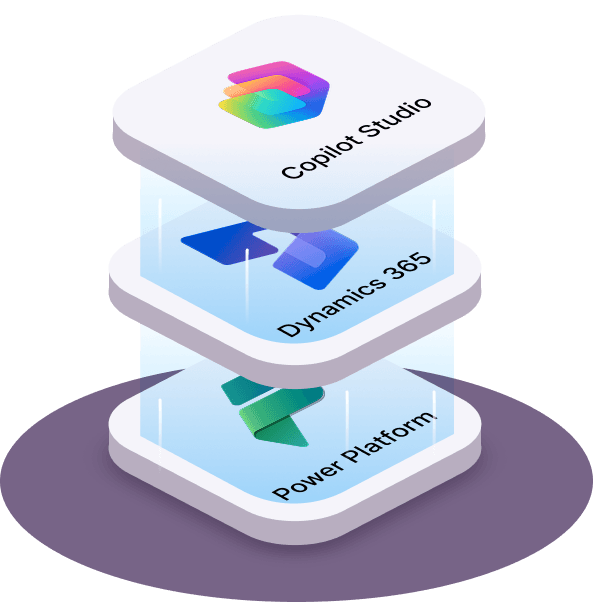
ERP, CRM, ISV solutions and Power Platform sit under one roof at Dynamics Square, so your agents are designed alongside the systems they serve.
Certified people
More than 150 certified professionals support over 500 clients worldwide, and we have delivered Microsoft solutions since 2011.
A structured method
Our architects question, analyse and recommend before they deploy anything.
Partnership over transactions
We work as an extension of your team, and our clients stay with us for more than five years on average.
How We Deliver Copilot Studio Projects
Analysis
We run discovery sessions, shortlist agent use cases, assess data readiness and select the licensing route.
Design
We define agent instructions, knowledge sources, actions, channels, security boundaries and the credit forecast.
Development
We build and configure the agents and flows, connect systems and test against real scenarios.
Deployment
We publish to Teams, Microsoft 365 Copilot, your website or other channels, train your users and complete go-live.
Post go-live
We monitor performance, tune agents and guide your internal teams as usage grows.
Copilot Studio Support After Go-Live
Agents improve with attention. Our Copilot Studio support covers the work that keeps them accurate and affordable:
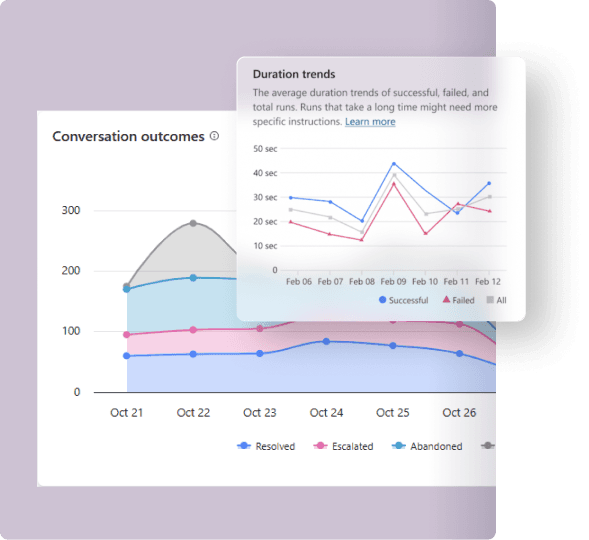
- Performance monitoring using Copilot Studio analytics to track outcomes and session results
- Quality checks with test sets before and after each change
- Credit consumption reviews in the Power Platform admin centre, with per-agent limits where needed
- Governance across your agent inventory, environments and access roles
- Enhancements as Microsoft releases new features and models
Start with a Free Copilot Studio Consultation
Speak to a Copilot Studio partner who gives you a plan you can act on. In one session, our experts will:
- Shortlist the agent use cases with the strongest payback in your business
- Recommend the licensing route for your users and channels
- Estimate Copilot Credit consumption with Microsoft's usage estimator
- Outline the path from pilot to production
Copilot Studio is Microsoft's low-code platform for building, publishing and managing AI agents and workflows. Describe an agent in everyday language or design it graphically, link it to your data and systems, then publish it to Teams, Microsoft 365 Copilot, your website, mobile apps and more.
Businesses use Microsoft Copilot Studio to answer employee and customer questions, automate workflows, complete tasks in business systems and run autonomous agents that plan and escalate work. Typical examples include IT support, HR screening, finance reconciliation, contract review and customer service.
Copilot Studio agents are AI systems that carry out business work for an individual, a team or a whole company. Some answer questions from connected knowledge, some act inside your systems, and some run independently, planning their own steps and escalating to a person when needed.
Copilot Studio capacity packs cost £153.80 per pack per month for 25,000 Copilot Credits. Pay-as-you-go billing charges only for credits consumed, and the pre-purchase plan saves up to 20%. Microsoft 365 Copilot starts at £23.10 per user per month, paid yearly, excluding VAT.
A Copilot Studio license is the entitlement that lets your organisation build and run agents. You can use Microsoft 365 Copilot for internal agents, or buy standalone Copilot Studio through capacity packs, pay-as-you-go or a pre-purchase plan. Makers also need a free Copilot Studio user licence assigned by an administrator.