How Yavrio Can Help You Connect Your D365 BC With Your Bank for Live Feeds and Bank Reconciliation
.png&w=3840&q=75&dpl=dpl_BmTcRbuQWaqryfkWHP9yeSuVw4id)
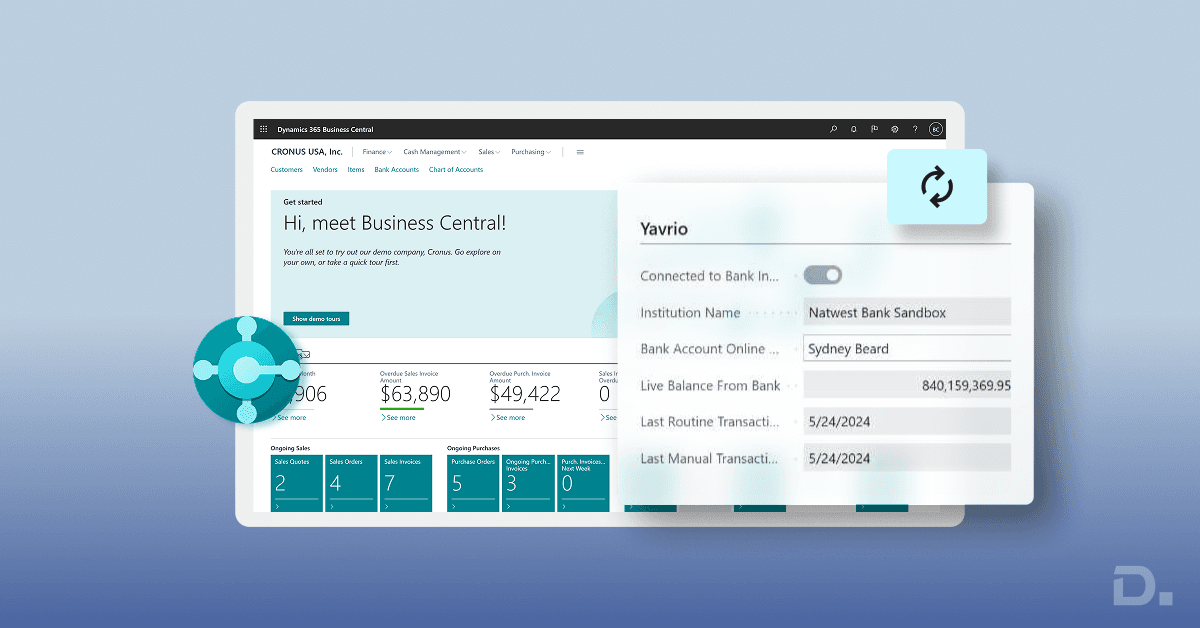
Financial teams across industries aim for clear, reliable, and timely bank information inside their accounting and ERP systems.
When a business works with Dynamics 365 Business Central, the finance team often seeks a smooth way to bring live bank feeds into the system. This helps the team maintain updated cash positions, complete reconciliations faster, and avoid delays during daily reporting.
Table of Contents
- Yavrio and Its Purpose in the Business Central Environment
- Why Businesses Seek Live Bank Feeds Inside Business Central
- How Yavrio Connects with Business Central
- Bank Reconciliation Inside Business Central
- The Importance of Accurate Bank Feeds for Reconciliation
- The Methods of Bank Reconciliation
- How Yavrio Supports Each Stage of Reconciliation
- How Businesses Gain Value from Yavrio During Daily Operations
- How Yavrio Handles Security and Compliance
- An Insight into Yavrio Bank Coverage
- How Yavrio Supports Businesses with Multiple Entities
- How Yavrio Helps Teams During Month End and Audit Preparation
- Why Yavrio Creates a Stable Experience for Business Central Users
Yavrio plays an important role in this area because it helps Microsoft Business Central users gather live data from banks through a secure and stable connection.
This blog explains how Yavrio supports this capability, how it works with bank accounts in Business Central, and how finance teams can streamline the reconciliation process with confidence every single day.
Yavrio and Its Purpose in the Business Central Environment
Before moving into the details of the Yavrio and Business Central integration, let’s understand the primary purpose of Yavrio first.
Many finance teams ask the question: What does Yavrio do? The answer is pretty straightforward.
Yavrio acts as a secure and reliable bridge between banks and Dynamics 365 Business Central. It collects live bank feeds, manages bank account connections, and helps the ERP system receive accurate financial information without manual downloads. This reduces repetitive work for accountants and supports daily financial visibility.
After Yavrio Business Central integration, the platform works with a wide variety of banks across several regions, which is usually called Yavrio Bank coverage. This means the system can support daily feeds from a large number of financial institutions, so teams working with multiple banks can still manage everything inside Microsoft Business Central.
Businesses also refer to Yavrio as Yavrio Bank, especially when discussing bank synchronisation features or access to various bank accounts. This phrase represents the idea that Yavrio becomes the financial link that gathers bank information and pushes it into the ERP system without additional work.
Why Businesses Seek Live Bank Feeds Inside Business Central
Finance teams spend significant time downloading bank statements, uploading files, matching entries, and checking transactions. These tasks take time and increase the risk of errors. With a direct feed powered by Yavrio in Business Central, financial teams can manage banking activities with greater confidence because every entry flows into the system with stable consistency. Teams gain clarity about available balances, authorised payments, incoming receipts, and transaction flows.
A live feed in Business Central creates smooth daily routines. Without the need to gather files manually, teams gain the freedom to focus on valuable work across cash forecasting, financial reporting, and payment management. This approach helps managers guide financial decisions based on updated information rather than outdated statements.
How Yavrio Connects with Business Central
The integration between Yavrio and Business Central depends on a structured setup that allows both systems to exchange information.
This includes setting up the Yavrio extension, gaining access to the Yavrio portal, signing into the appropriate bank, granting permissions for the feed, and synchronising the connection with Business Central.
Once configured, the system pulls bank transactions daily. The finance team can view these entries inside the bank account area of Dynamics 365 Business Central.
This structured connection helps teams maintain clean records. It supports cash flow reports, payment journals, and reconciliation tasks with greater accuracy, because the system reflects live transactions from the bank. Teams gain an easier experience while managing financial activities.
Bank Reconciliation Inside Business Central
One of the most common questions among users involves the process itself. People often ask: How to do a bank reconciliation in Dynamics 365? The answer is: Business Central displays bank ledger entries and imported bank transactions on the reconciliation screen. The user reviews both sides, matches entries, posts adjustments if required, and confirms the reconciliation once everything aligns.
The system shows all relevant information in a structured format. The user gains a clear view of bank entries, outstanding transactions, and differences that require action. With Yavrio feeds inside Business Central, the bank side of the reconciliation arrives in the system automatically, which creates a peaceful and organised experience for the finance team.
The Importance of Accurate Bank Feeds for Reconciliation
Accurate reconciliation depends on updated bank information. Even a small delay in gathering the statement can complicate the process. A live feed powered by Yavrio provides stability because each transaction flows into the system daily. When teams prepare monthly, weekly, or daily reconciliations, they can rely on updated data inside D365 BC or Business Central. This reduces uncertainty and improves team confidence.
Automatic feeds also reduce repetitive manual work because the team does not gather files for every account. Yavrio handles this process through secure connections, which gives teams a smooth workflow.
The Methods of Bank Reconciliation
Businesses often want to know: What are the methods of bank reconciliation
Well, finance teams generally follow three methods, which are listed below:
Manual method
The accountant downloads the bank statement, uploads it into Microsoft Business Central, reviews each entry, matches records, and posts adjustments. This method requires significant time because many steps take place manually.
Semi-automated method
The statement arrives through a digital file that the system can understand. The accountant uploads this file, and the system helps match several entries automatically. The accountant then completes the remaining matches and posts the reconciliation.
Automated feed method
This is the method supported by Yavrio. The system receives bank transactions automatically. The accountant opens the reconciliation page with updated data already available, completes the matching process, and posts the reconciliation with greater ease.
The automated feed method often suits growing businesses because it supports faster work and reduces the possibility of errors.
How Yavrio Supports Each Stage of Reconciliation
Yavrio helps every stage of the reconciliation process. It brings updated transaction data into the system, which reduces time spent gathering statements. It connects directly with bank accounts and uses secure protocols to collect data. The system then delivers the information to Business Central through the Yavrio integration. Accountants can manage reconciliation pages with greater peace because accurate bank entries already appear on the screen.
Finance teams also benefit from consistent formats. Yavrio maintains a structured approach across banks with strong Yavrio Bank coverage, which ensures that Business Central receives transactions with reliable formatting. This helps avoid confusion during matching and adjustments.
How Businesses Gain Value from Yavrio During Daily Operations
Yavrio brings several practical benefits for financial teams inside Dynamics 365 Business Central. Every benefit supports daily operations and long-term stability.
Greater accuracy
When bank feeds arrive automatically, the system reduces the risk of incorrect files or repeated uploads. This creates a cleaner financial environment.
Faster reconciliation
Teams gain speed because they begin the process with updated bank entries ready for review. The structured interface helps complete the task efficiently.
Better cash visibility
Managers gain an updated view of cash across accounts because the system receives daily information from the bank.
Consistent formatting
The feed arrives in a consistent structure, which helps the accountant view entries with clarity.
Reduced administrative effort
The finance team has fewer manual tasks. This helps the team allocate time to planning, reporting, and forecasting.
Stable integration
The Yavrio and Business Central connection remains stable because it uses secure technology and predictable update routines.
How Yavrio Handles Security and Compliance
Financial data requires strong security measures. Yavrio follows industry guidelines to ensure the protection of all information during transmission.
The system uses secure connections, encrypted communication, and permission-based access. These measures help organisations maintain financial compliance according to internal policies and external requirements. Yavrio continues to strengthen security across regions as part of its mission to support safe banking connections.
An Insight into Yavrio Bank Coverage
Many organisations work with several banks across multiple regions. This introduces complexity because each bank uses different systems, formats, and online portals.
Yavrio helps simplify these challenges through wide Yavrio Bank coverage. This coverage includes support for many financial institutions across the United Kingdom, Europe, and further regions. The system continues to expand coverage as banking standards progress.
The advantage of strong coverage remains clear. Businesses with multiple accounts gain a consistent experience across all banks. This helps the finance team manage daily feeds in a uniform environment, which reduces complexity during reconciliation and cash planning.
How Yavrio Supports Businesses with Multiple Entities
Organisations with several companies or divisions often seek a unified approach to bank feeds. Yavrio supports this requirement through structured connections that allow each company to manage its own bank accounts inside Business Central.
The finance team can assign feeds to the correct companies and maintain clarity at the entity level. This helps accountants manage reconciliation and reporting for each business without confusion.
Use Case: Yavrio Supporting a Finance Team
Think of a company with three bank accounts across two financial institutions. The finance team manages payments, receipts, transfers, and reconciliations daily.
Without Yavrio, the team gathers statements manually and spends significant time uploading files. Small errors during downloads or uploads can create confusion during reconciliation.
With Yavrio feeds, the team gains updated data inside Microsoft Dynamics 365 Business Central every day. The accountant opens the reconciliation screen, views updated bank entries, completes the matching process, and finishes the task efficiently.
Now, this approach supports a peaceful month-end and a smooth audit process. It also gives managers a clear view of treasury positions across accounts.
How Yavrio Helps Teams During Month End and Audit Preparation
Month-end routines generally involve reconciliation, reviews, adjustments, and financial reporting. When bank feeds arrive automatically, the finance team gains confidence because bank entries match real activity with structured consistency. This helps the team complete reporting with clarity. During audits, accountants can display updated bank entries, clear reconciliation records, and the entire transaction flow with ease. Auditors appreciate this type of organisation because it reflects disciplined financial routines.
Why Yavrio Creates a Stable Experience for Business Central Users
The integration between Yavrio and Business Central remains stable due to structured communication channels, predictable updates, secure authentication, and reliable data delivery.
These elements ensure that bank transactions appear inside the system with dependable consistency. Finance teams prefer this experience because it reduces repetitive tasks and helps maintain strong financial records.
The platform also provides helpful support materials, regular updates, and clear guidance for users. This helps organisations maintain a smooth experience long after implementation.
Closing Thoughts
Financial clarity depends on accurate bank information, smooth daily routines, and structured reconciliation processes. By integrating Yavrio with D365 Business Central, organisations gain a powerful approach that supports live feeds, accurate records, and efficient financial operations.
Through this integration, businesses build a financial environment that supports accuracy, stability, and peace across daily operations. Yavrio helps teams maintain updated bank information without repetitive work, which creates a dependable foundation for strong financial management across the organisation.
How Dynamics Square Enhances Your Bank Integration Experience
Dynamics Square helps organisations improve their financial processes by setting up D365 Business Central in an organised way and providing dependable integrations that aid in their everyday accounting tasks.
The team helps clients choose and set up effective solutions like Yavrio, providing support for secure bank connections, organised payment processes, automatic reconciliation, and clear views of finances across accounts.
With consistent experience across banking integrations and Business Central customisations, Dynamics Square helps finance teams build a reliable environment that supports accurate reporting, timely reconciliations, and confident decision-making across all financial activities.
Ready to connect Yavrio with Business Central?
Dynamics Square UK can help you integrate Yavrio with Business Central for bank feeds, reconciliation and streamlined financial processes.
Talk to a Business Central specialist