Managing machines, production equipment, vehicles, and other physical assets becomes increasingly complex as a business grows. When asset information, maintenance schedules, work orders, spare parts, and financial data are managed across disconnected systems, maintenance teams can struggle to keep assets available and control operating costs.
Dynamics 365 Asset Management provides capabilities for managing physical assets and maintenance activities within Microsoft Dynamics 365 Supply Chain Management. It helps organisations manage assets, maintenance plans, work orders, maintenance requests, asset hierarchies, functional locations, maintenance jobs, and related information throughout the asset lifecycle.
Table of Contents
- What is Dynamics 365 Asset Management?
- What Does Dynamics 365 Asset Management Do?
- What are the Challenges of Traditional Asset Management?
- What are the Benefits of Dynamics 365 Asset Management?
- Key Dynamics 365 Solutions for Asset Management
- How Does Dynamics 365 Asset Management Work?
- Preventive Maintenance in Dynamics 365 Asset Management
- Predictive and Condition-Based Asset Maintenance
- Asset Management and IoT
- Dynamics 365 Asset Management for Manufacturing
- Dynamics 365 Asset Management for Other Industries
- Dynamics 365 Asset Management vs Fixed Asset Management
- Dynamics 365 Asset Management vs Business Central
- Real-World Examples of Dynamics 365 Asset Management
- Dynamics 365 Asset Management Implementation Best Practices
- What KPIs Can You Track with Dynamics 365 Asset Management?
- How Much Does Dynamics 365 Asset Management Cost?
- How Can Dynamics Square UK Help with Dynamics 365 Asset Management?
- Frequently Asked Questions
For organisations that also need financial asset tracking, customer asset management, or field-service processes, other Dynamics 365 applications can complement Asset Management. These include Dynamics 365 Finance, Dynamics 365 Field Service, and the wider Microsoft Power Platform.
What is Dynamics 365 Asset Management?
Dynamics 365 Asset Management is a maintenance and asset management module within Dynamics 365 Supply Chain Management. It helps businesses manage physical assets such as machines, production equipment, vehicles, and machine components that require ongoing maintenance.
The module supports the planning, execution, and monitoring of maintenance activities. Assets can be organised into hierarchical structures and related to functional locations, while maintenance jobs can be planned against assets and locations.
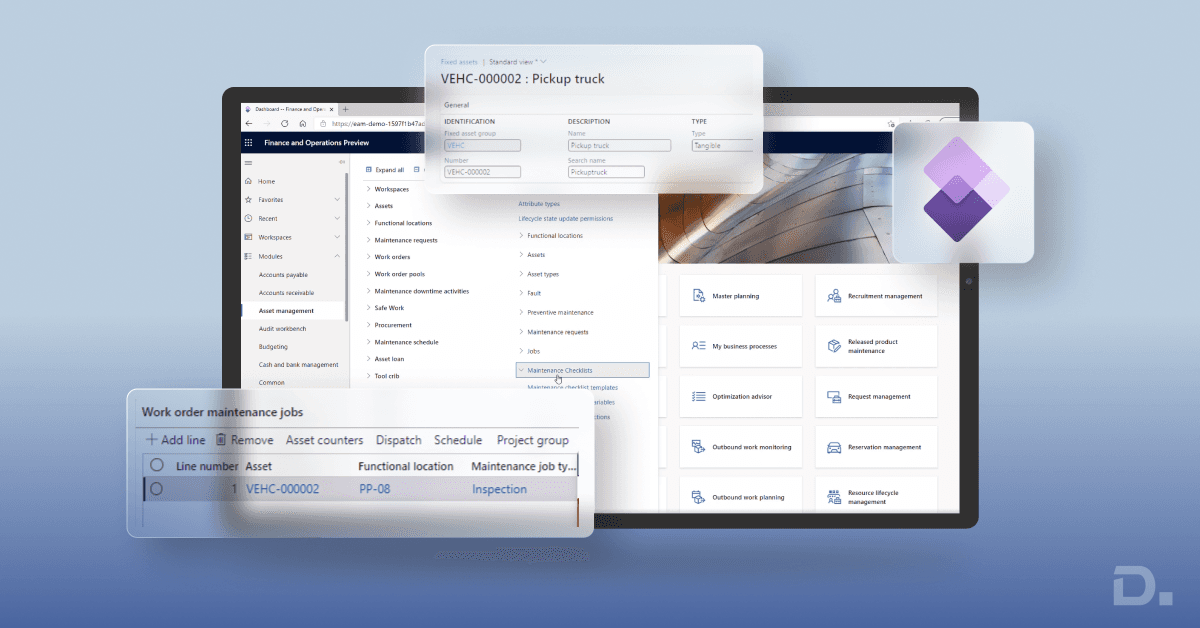
Dynamics 365 Asset Management also supports maintenance requests and work orders. Work orders can be created manually or automatically based on maintenance requirements, and they can include maintenance jobs, forecasts, resources, tools, and spare parts.
This allows maintenance teams to move from reactive repair processes towards more structured preventive and condition-based maintenance practices.
What Does Dynamics 365 Asset Management Do?
Dynamics 365 Asset Management helps organisations manage the operational side of physical assets and their maintenance activities. Its capabilities include:
Asset registration and asset hierarchies
Functional location management
Maintenance requests
Preventive maintenance planning
Time-based and counter-based maintenance
Maintenance work orders
Maintenance job types and checklists
Maintenance scheduling
Maintenance downtime tracking
Spare parts and maintenance forecasts
Asset performance and maintenance KPIs
Asset and maintenance history
Integration with other Dynamics 365 Supply Chain Management processes
Microsoft describes assets and work orders as central components of Asset Management. Assets can be arranged in hierarchical structures and connected to functional locations, while work orders define the maintenance work that needs to be performed.
What are the Challenges of Traditional Asset Management?
Organisations managing assets through spreadsheets, disconnected maintenance applications, or manual processes can face several operational challenges.
1. Limited Asset Visibility
When asset information is stored across different systems, maintenance teams may not have a consistent view of asset location, condition, maintenance history, or upcoming work.
2. Reactive Maintenance
Relying mainly on breakdown maintenance can result in unexpected downtime, emergency repairs, and disruption to production. A structured maintenance approach can help teams plan maintenance before issues become more disruptive.
3. Manual Maintenance Scheduling
Manually tracking service intervals and maintenance requirements makes it easier to miss scheduled work. This can be particularly difficult when an organisation manages hundreds or thousands of assets.
4. Poor Spare Parts Visibility
Maintenance work often depends on having the right spare parts available. Poor coordination between maintenance, inventory, and procurement teams can delay repairs.
5. Difficulty Tracking Downtime
Without accurate downtime records, organisations may struggle to understand asset availability, recurring failures, and maintenance performance.
6. Disconnected Financial and Operational Data
Asset maintenance decisions can affect operating costs, investment planning, and asset value. Connecting maintenance information with financial processes can provide a broader view of asset-related costs.
What are the Benefits of Dynamics 365 Asset Management?
Dynamics 365 Asset Management can help organisations create a more structured approach to maintenance planning and asset operations. Key benefits include:
1. Centralised Asset Information
Asset Management provides a structured environment for maintaining asset information, asset relationships, functional locations, maintenance plans, and work orders.
This gives maintenance teams a more consistent view of the assets they are responsible for.
2. Preventive Maintenance Planning
Maintenance plans can be created for assets, asset types, functional locations, and functional location types. Plans can use time-based or counter-based intervals to help schedule planned maintenance.
Maintenance plans can generate maintenance schedule lines and, where configured, work orders automatically.
3. Better Work Order Management
Work orders are a central part of Dynamics 365 Asset Management. They can be created manually or automatically and can include one or more maintenance jobs.
Work orders can be used for preventive maintenance, corrective maintenance, inspections, and other maintenance activities.
4. Improved Maintenance Scheduling
Maintenance teams can schedule work orders and allocate the required maintenance workers and tools. Forecasts for hours, items, and expenses can also be associated with maintenance work.
This helps organisations plan resources and maintenance activities more effectively.
5. Reduced Unplanned Downtime
Asset Management provides tools for planning maintenance and recording downtime. Organisations can analyse downtime information to understand asset availability, stops, and maintenance performance.
Microsoft provides Asset KPIs and maintenance downtime functionality to help organisations measure asset availability and maintenance performance.
6. Better Maintenance Cost Control
Maintenance forecasts can include expected hours, items, and expenses. This gives maintenance teams greater visibility into the resources and costs associated with planned work.
7. Asset Hierarchies and Functional Locations
Assets can be organised into hierarchical structures and related to functional locations. This is particularly useful for organisations managing complex equipment structures, production lines, facilities, or multiple operational sites.
8. Maintenance History and Performance Insights
By maintaining asset and work order information in a structured system, businesses can review maintenance activity, downtime, work completion, and other operational information to support better maintenance decisions.
Key Dynamics 365 Solutions for Asset Management
Asset management in the Microsoft Dynamics 365 ecosystem is not limited to one business application. Different Dynamics 365 applications address different aspects of asset-related processes.
1. Dynamics 365 Supply Chain Management
Dynamics 365 Supply Chain Management contains the dedicated Asset Management module for managing physical assets and maintenance activities.
Key capabilities include:
Asset and functional location management
Maintenance requests
Maintenance plans
Maintenance rounds
Preventive and corrective maintenance
Work orders and maintenance jobs
Maintenance scheduling
Maintenance checklists
Maintenance forecasts
Downtime tracking
Asset KPIs
It is particularly relevant for asset-intensive organisations such as manufacturing, utilities, healthcare, energy, and other businesses that operate and maintain physical equipment.
2. Dynamics 365 Finance
Dynamics 365 Finance supports the financial side of asset management through fixed asset functionality.
This includes processes such as:
Asset acquisition
Capitalisation
Depreciation
Asset disposal
Asset value tracking
Financial reporting
Dynamics 365 Finance can therefore complement Supply Chain Management when businesses need to connect operational asset management with financial processes.
3. Dynamics 365 Field Service
Dynamics 365 Field Service focuses on servicing assets at customer locations and supporting field technicians.
Its asset-related capabilities include customer asset tracking, service history, work orders, preventive maintenance, technician scheduling, and mobile execution.
Field Service can associate customer assets with work order incidents and service agreements, allowing organisations to build a service history for customer equipment.
4. Microsoft Power Platform
The Microsoft Power Platform can extend asset management processes through connected applications and automation.
Power BI can be used to analyse maintenance costs, asset performance, downtime, and operational KPIs.
Power Automate can support workflow automation and notifications.
Power Apps can support custom applications for inspections, data capture, or other business processes.
How Does Dynamics 365 Asset Management Work?
A typical Dynamics 365 Asset Management process can be structured around the following stages:
1. Create and Structure Assets
Businesses create assets and maintain relevant asset information. Assets can be organised into hierarchical structures and related to functional locations.
2. Define Maintenance Requirements
Maintenance plans and job types can be defined based on the asset, maintenance requirement, time interval, counter, or operational process.
3. Generate Maintenance Requests or Work Orders
Maintenance work can originate from maintenance requests or planned maintenance activities. Work orders can be created manually or generated from configured maintenance processes.
4. Schedule Maintenance Work
Maintenance teams can estimate required hours, resources, tools, items, and expenses before scheduling work orders.
5. Execute the Maintenance Job
Maintenance workers perform the required jobs and can record time, spare parts, checklists, and other information associated with the work order.
6. Record Downtime and Results
Organisations can record maintenance downtime and review completed work to understand asset availability and maintenance performance.
7. Analyse Asset Performance
Maintenance and operational data can then be used to identify recurring problems, maintenance trends, costs, and opportunities to improve asset performance.
Preventive Maintenance in Dynamics 365 Asset Management
Preventive maintenance is one of the core use cases of Dynamics 365 Asset Management. It involves planning maintenance activities before equipment fails.
Maintenance plans can be configured using time-based or counter-based intervals. For example, a business could schedule maintenance every six months or after an asset reaches a defined usage level.
Maintenance rounds can also be used when similar maintenance activities need to be performed across multiple assets at regular intervals, such as lubrication or safety inspections.
Predictive and Condition-Based Asset Maintenance
Predictive maintenance uses asset condition, usage, sensor information, historical data, or other signals to identify when maintenance may be required.
Dynamics 365 Asset Management supports counter-based maintenance scenarios and can be used as part of broader IoT and data-driven maintenance architectures. The exact predictive maintenance approach depends on the organisation's asset data, connected devices, integrations, and implementation design.
This distinction is important: Dynamics 365 Asset Management should not be presented as automatically predicting every equipment failure simply by enabling the module. Predictive scenarios generally require appropriate data, configuration, integrations, and analytical capabilities.
Asset Management and IoT
IoT can extend asset management by providing operational or sensor data from connected equipment. When connected data is integrated into a maintenance process, organisations can use it to monitor equipment conditions, identify maintenance requirements, and support more proactive maintenance decisions.
For organisations looking to combine IoT, analytics, and Dynamics 365, Azure IoT solutions and Power BI can complement Dynamics 365 implementations.
Dynamics 365 Asset Management for Manufacturing
Manufacturing businesses often operate large numbers of machines, production lines, tools, and other equipment. Equipment downtime can affect production schedules, maintenance costs, inventory requirements, and customer commitments.
Dynamics 365 Asset Management can help manufacturing organisations:
Organise production assets and functional locations
Schedule preventive maintenance
Create and manage maintenance work orders
Track maintenance jobs and downtime
Plan required maintenance resources and spare parts
Monitor asset-related KPIs
Connect maintenance processes with Supply Chain Management
This makes Asset Management particularly relevant for businesses where equipment availability directly affects production capacity.
Dynamics 365 Asset Management for Other Industries
Healthcare
Healthcare organisations can use structured asset and maintenance processes to manage equipment that requires regular servicing, inspection, or calibration.
Energy and Utilities
Energy and utility organisations often manage large numbers of geographically distributed assets. Asset hierarchies, functional locations, maintenance plans, work orders, and downtime tracking can help coordinate maintenance operations.
Equipment Hire
Equipment hire businesses need visibility into asset availability, utilisation, maintenance, and return cycles. Connecting asset and operational data can help teams manage equipment throughout its working lifecycle.
Industrial and Process Manufacturing
Asset-intensive manufacturing businesses can use maintenance plans, work orders, checklists, downtime tracking, and asset KPIs to support more structured maintenance operations.
Dynamics 365 Asset Management vs Fixed Asset Management
Asset Management and fixed asset management are related but serve different purposes.
| Area | Dynamics 365 Asset Management | Fixed Asset Management |
|---|---|---|
| Primary purpose | Operational asset maintenance | Financial asset management |
| Maintenance planning | Yes | Limited to fixed-asset maintenance tracking |
| Work orders | Yes | Not the primary purpose |
| Depreciation | Works with related financial processes | Core capability |
| Asset hierarchy | Yes | Supports fixed asset structures and components |
| Maintenance downtime | Yes | Not the primary purpose |
In Dynamics 365, organisations may use Supply Chain Management Asset Management for operational maintenance and Dynamics 365 Finance for the financial management of fixed assets.
Dynamics 365 Asset Management vs Business Central
It is important not to treat the fixed asset functionality in Dynamics 365 Business Central as equivalent to the dedicated Asset Management module in Dynamics 365 Supply Chain Management.
Dynamics 365 Business Central provides fixed asset functionality for processes such as acquisition, depreciation, disposal, insurance, and maintenance cost tracking.
Microsoft's current Business Central documentation also supports recording maintenance costs and next service dates for fixed assets. However, Business Central's standard Fixed Assets functionality is not the same as the dedicated maintenance-focused Asset Management module in Dynamics 365 Supply Chain Management.
Businesses that require advanced enterprise asset management and maintenance capabilities in Business Central can also consider third-party extensions available through Microsoft AppSource, depending on their requirements.
| Feature | Dynamics 365 Supply Chain Management Asset Management | Dynamics 365 Business Central |
|---|---|---|
| Operational asset maintenance | Dedicated capability | Requires standard functionality and/or extension depending on requirements |
| Maintenance plans | Yes | Not equivalent to SCM Asset Management maintenance plans |
| Maintenance work orders | Yes | Advanced EAM generally requires an extension |
| Fixed asset accounting | Integrated with Finance processes | Core Fixed Assets functionality |
| Depreciation | Finance | Yes |
| Asset hierarchy and functional locations | Yes | Not equivalent to SCM Asset Management |
Real-World Examples of Dynamics 365 Asset Management
Microsoft customer stories demonstrate how Dynamics 365 solutions can support asset-intensive business operations.
Speedy Services
UK equipment hire company Speedy Services modernised its ERP environment using Dynamics 365 Finance and Supply Chain Management. Its implementation provides greater visibility across its operations and product lines.
Read the Speedy Services customer story on Microsoft.
Enerjisa Üretim
Enerjisa Üretim uses Dynamics 365 Supply Chain Management and asset management capabilities as part of its digital maintenance and operational processes. Its approach includes IoT, digital technologies, and mobile applications to support maintenance activities.
Read the Enerjisa Üretim customer story on Microsoft.
Dynamics 365 Asset Management Implementation Best Practices
1. Define Asset Management Objectives
Start by identifying the business outcomes you want to achieve. These may include reducing downtime, improving asset availability, improving maintenance planning, controlling maintenance costs, or improving compliance.
2. Build a Clear Asset Structure
Define asset types, asset hierarchies, functional locations, maintenance job types, and other master data before configuring maintenance processes.
3. Define Maintenance Plans
Determine which assets require time-based, counter-based, inspection, or other maintenance activities. Configure maintenance plans around actual operational requirements.
4. Standardise Work Order Processes
Define work order types, lifecycle states, maintenance jobs, checklists, required resources, and approval processes so maintenance teams follow consistent procedures.
5. Connect Maintenance with Inventory
Review the spare parts required for maintenance activities and ensure the relevant inventory and procurement processes are aligned with maintenance requirements.
6. Connect Asset Management with Finance
Where required, connect operational asset information with financial processes so businesses can understand maintenance costs, asset value, depreciation, and investment requirements.
7. Plan Integrations Early
If your organisation requires IoT, Power BI, Power Apps, Power Automate, or other integrations, define those requirements during the solution design stage rather than treating them as an afterthought.
8. Train Maintenance Teams
Provide role-based training for maintenance managers, planners, technicians, finance teams, and other users who interact with asset information.
9. Track Relevant KPIs
Measure metrics such as asset availability, downtime, maintenance costs, work order completion, planned versus reactive maintenance, and other KPIs that are relevant to your operation.
10. Continuously Optimise Maintenance Processes
Use maintenance history and operational data to identify recurring issues, review maintenance intervals, improve resource planning, and refine maintenance processes over time.
What KPIs Can You Track with Dynamics 365 Asset Management?
Asset Management can provide information that helps organisations evaluate maintenance performance and asset availability.
Depending on the configuration, relevant KPIs can include:
Asset availability
Maintenance downtime
Maintenance costs
Work order completion rates
Preventive versus corrective maintenance
Maintenance workload
Asset failure frequency
Maintenance response time
Spare parts consumption
Maintenance schedule performance
These metrics can be combined with reporting and analytics tools such as Power BI to create management dashboards and support data-driven maintenance decisions.
How Much Does Dynamics 365 Asset Management Cost?
There is no single price for a Dynamics 365 Asset Management implementation because the overall cost depends on the Dynamics 365 applications required, user licensing, implementation scope, configuration, integrations, data migration, customisation, training, and ongoing support.
For example, an organisation implementing Supply Chain Management with Asset Management may have different requirements from a business using Finance for fixed asset accounting and Field Service for customer equipment.
Before estimating the investment, businesses should define their asset structure, maintenance processes, number of users, integrations, reporting requirements, and implementation scope.
Learn more about Dynamics 365 pricing and licensing.
How Can Dynamics Square UK Help with Dynamics 365 Asset Management?
Implementing Dynamics 365 Asset Management requires more than configuring software. Businesses need to understand their asset structures, maintenance processes, work order requirements, integrations, reporting needs, and user roles before designing the solution.
Dynamics Square UK can help businesses assess their requirements and plan a Dynamics 365 solution around their asset and maintenance processes.
Our team can support areas such as Dynamics 365 implementation, configuration, integration, data migration, training, and ongoing Dynamics 365 support.
If you are planning to implement Dynamics 365 Asset Management or want to improve your existing maintenance processes, contact Dynamics Square UK to discuss your requirements.
Frequently Asked Questions
Dynamics 365 Asset Management is a module within Dynamics 365 Supply Chain Management that helps organisations manage physical assets, maintenance plans, maintenance requests, work orders, maintenance jobs, functional locations, downtime, and related maintenance processes.
The dedicated Asset Management module is part of Dynamics 365 Supply Chain Management. Dynamics 365 Finance provides fixed asset financial management, while Dynamics 365 Field Service provides customer asset and field maintenance capabilities for service organisations.
Yes. Work orders are a central part of Asset Management. They can contain maintenance jobs and can be created manually or automatically for preventive, corrective, reactive, and inspection activities.
Business Central includes Fixed Assets functionality for acquisition, depreciation, disposal, insurance, and maintenance cost tracking. It does not provide the same dedicated Asset Management module as Dynamics 365 Supply Chain Management. Advanced EAM and maintenance requirements can be addressed through suitable extensions.
Yes. Manufacturing organisations can use Asset Management to manage production equipment, maintenance plans, work orders, downtime, maintenance resources, and other asset-related processes.
Dynamics Square UK can help businesses assess their asset management requirements, design and implement Dynamics 365 solutions, configure maintenance processes, integrate related Microsoft technologies, and provide training and support.