.jfif&w=3840&q=75&dpl=dpl_BmTcRbuQWaqryfkWHP9yeSuVw4id)
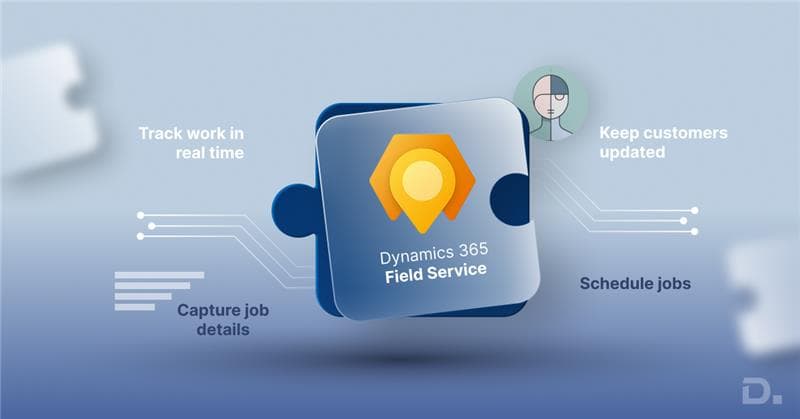
Managing a field workforce becomes increasingly difficult when job scheduling, customer information, engineer availability, assets, inventory, service history, and invoicing are spread across different systems.
Field service management software helps businesses bring these activities together. It enables organisations to schedule and dispatch technicians, manage work orders, monitor field activities, track assets, maintain service records, and connect mobile workers with office-based teams.
Table of Contents
- Struggling to Manage Jobs, Technicians, and Customer Updates?
- What Is Field Service Management Software?
- Want to See How Modern FSM Software Works in Real Life?
- What Does Field Service Management Software Do?
- Why Field Service Management Software Matters in the UK
- Benefits of Field Service Management Software
- Field Service Management Features to Look For
- 10 Field Service Management Software Options in the UK
- Considering Microsoft Dynamics 365 Field Service?
- Field Service Software Integrations
- Need Field Service, CRM, and ERP Working as One System?
- What Is the Difference Between CRM and FSM?
- Field Service Software Requirements for UK Businesses
- Choosing the Right Field Service Management Software
- Some FAQs of FSM Software
For UK businesses, choosing the right field service management software UK solution depends on more than having a long list of features. Company size, industry, number of technicians, existing ERP and CRM systems, mobile requirements, compliance needs, integration requirements, and future growth should all influence the decision.
Some organisations need a straightforward field service system for scheduling and invoicing. Others need enterprise-level field service management connected with finance, CRM, inventory, asset management, AI, analytics, and wider business operations.
Struggling to Manage Jobs, Technicians, and Customer Updates?
This write up explains important questions like what field service management software does, service management software benefits, and the field service software options available in the UK today.
What Is Field Service Management Software?
Field service management software, commonly known as FSM software, is a digital system used to manage employees, contractors, equipment, and service activities performed away from a company's main premises.
Typical capabilities include:
- Work order management
- Technician scheduling and dispatch
- Route planning
- Mobile access for engineers
- Asset and equipment management
- Inventory and spare parts management
- Preventive maintenance
- Customer communication
- Quotes and invoicing
- Service history
- Reporting and analytics
- ERP and CRM integration
A modern field service management system provides office teams and technicians with access to connected information rather than relying on spreadsheets, paper-based job sheets, emails, calls, and separate applications.
For larger organisations, FSM can also become part of a wider ERP, CRM, customer service, finance, supply chain, and asset management environment.
Want to See How Modern FSM Software Works in Real Life?
What Does Field Service Management Software Do?
Many people assume field service software is just a scheduling tool. It is not.
A complete system usually handles:
- Job creation and dispatch
- Technician calendars and routing
- Mobile apps for engineers
- Asset and equipment history
- Parts and inventory tracking
- Time, expense, and job costing
- Customer communication
- Reporting and performance tracking
So what does FSM software do in practice? It removes friction. It reduces the manual coordination that drains time every day. Managers see workload clearly. Engineers see their tasks clearly. Finance sees the cost clearly.
That clarity alone often justifies the investment.
Why Field Service Management Software Matters in the UK
Running field operations in the UK comes with its own pressures.
You are dealing with:
- Tight service-level agreements
- Rising labour and fuel costs
- Compliance requirements
- Customers expecting real-time updates
- Difficulty hiring skilled technicians
Field service management software UK providers have shaped their systems around these realities. Many solutions now support mobile working, audit tracking, and integration with accounting and ERP platforms.
Without the right system, admin grows while visibility shrinks. That imbalance becomes expensive very quickly.
Benefits of Field Service Management Software
The benefits of field service management software are rarely dramatic at first. They show up quietly in daily routines.
You may notice:
- Fewer missed appointments
- Better scheduling accuracy
- Reduced travel time
- Faster invoicing
- Improved first-time fix rates
- Clearer technician workload visibility
- More accurate service costing
Over time, those small improvements add up. Admin hours drop. Customers complain less. Managers stop firefighting and start planning.
That is usually when teams realise the software is doing more than they thought.
Field Service Management Features to Look For
When comparing field service management software options in the UK, long feature lists can be misleading. What matters is whether the core field service management features actually solve your operational pain points.
Look for:
- Scheduling and dispatch – simple and flexible
- Mobile access – engineers updating jobs on-site
- Asset management – full equipment history
- Inventory control – parts tracked properly
- Job costing – labour, parts, expenses combined
- Customer visibility – status updates and job history
- Reporting – clear service performance insights
The best systems do not overwhelm engineers. They support them.
10 Field Service Management Software Options in the UK
The UK market offers both specialist field service platforms and ERP-connected systems. Each serves a slightly different type of business.
1. Dynamics 365 Field Service
Microsoft Dynamics 365 Field Service works as part of a wider operational system, rather than acting only as a scheduling tool. Companies often choose it when service activity directly impacts invoicing, contracts or customer relationships, and they want everything handled in one place.
It supports:
- Advanced scheduling and route optimisation
- Mobile apps for technicians
- Asset and preventive maintenance tracking
- Integration with finance and CRM
Because jobs, parts, and labour automatically connect to customer and billing data, teams spend less time correcting invoices later. Organisations gain clearer service profitability and fewer invoicing disputes.
Best for: mid-sized and large service organisations that need operational control alongside CRM and ERP visibility.
Considering Microsoft Dynamics 365 Field Service?
2. IFS Cloud FSM
IFS is particularly relevant to organisations where field service involves complex equipment, assets, contracts, maintenance requirements, SLAs, and large distributed workforces.
It can be considered by businesses operating in industries such as manufacturing, energy, utilities, telecommunications, aerospace, engineering, and other asset-heavy environments.
IFS places significant emphasis on intelligent scheduling, asset visibility, maintenance and connecting field operations with wider enterprise processes.
Best for: Large and asset-intensive organisations.
3. ServiceNow FSM
ServiceNow Field Service Management helps organisations manage work orders, field technicians, scheduling, dispatch and service workflows.
One of its main strengths is workflow automation. Field operations can be connected with other processes running through the ServiceNow platform, making it particularly relevant to organisations that already use ServiceNow extensively.
ServiceNow states that its scheduling capabilities can consider technician skills, location and availability when assigning field work.
Best for: Enterprises requiring connected workflows across multiple departments.
4. Joblogic
Joblogic is a UK-based platform designed mainly for service businesses that just want a solid operational tool. It handles scheduling, job tracking, assets, and live updates without trying to become a full ERP system.
Companies often choose it when they want structure but not complexity.
Best for: small to mid-sized service businesses.
5. Collabit
Collabit is more flexible than structured. Teams use it when their workflows don’t fit standard templates and they need something they can shape around how they already operate.
It works well in environments where processes keep changing or differ between teams.
Best for: service teams with unique or evolving workflows.
6. Totalmobile
Totalmobile targets larger teams, often with 100+ workers. It is widely used in utilities, healthcare, and regulated environments. It focuses on workforce optimisation and route planning.
Best for: large, compliance-driven field operations.
7. RedZebra
RedZebra keeps things simple. It reduces admin work with straightforward job scheduling and mobile tools.
Best for: small field service teams wanting ease of use.
8. Praxedo
Praxedo markets itself as an AI-powered platform. Its strength lies in dispatching and technician productivity.
Best for: growing businesses with complex scheduling demands.
9. Simpro
Simpro is popular among trade-based services such as electrical and HVAC. It supports quoting, job management, and on-site payments.
Best for: trades and project-based service firms.
10. Jobber
Jobber provides a comparatively straightforward platform for activities such as:
- Quotes
- Scheduling
- Customer management
- Invoicing
- Payments
- Team management
Its focus makes it particularly relevant to smaller businesses that may not require the complexity of an enterprise field service platform.
Best for: Small field service and home service businesses.
Field Service Software Integrations
Let’s learn more about field service software integration and add-on solutions that can be used to enhance capabilities.
Dynamics 365 CRM + Field Service Software
When Dynamics 365 CRM and field service software are combined, the service team gains context.
This means:
- Sales history is visible before attending a job
- Contract terms and SLAs are clear
- Customer value is understood
- Billing disputes reduce
CRM answers relationship questions. FSM executes the work. Together, they remove blind spots.
Business Central ERP + Field Service Integration
Business Central ERP + Field Service integration is valuable for companies where finance control matters.
When connected properly:
- Job costs post directly into finance
- Parts usage updates inventory
- Invoices reflect real work completed
- Profitability is visible per job or contract
This integration often separates businesses that guess margins from those that measure them.
Need Field Service, CRM, and ERP Working as One System?
Field Service Software for Small Businesses
Field service software for small business should not feel heavy or overwhelming.
Smaller teams usually need:
- Simple scheduling
- Clear mobile updates
- Basic invoicing
- Clean customer records
The right system reduces admin. If it adds complexity, it will not be used.
What Is the Difference Between CRM and FSM?
This question comes up often.
CRM focuses on managing relationships, sales, and communication.
FSM focuses on executing work in the field.
CRM asks:
Who is the customer and what have we agreed?
FSM asks:
Who is doing the work, when, and at what cost?
When integrated properly, they complement each other rather than compete.
Field Service Software Requirements for UK Businesses
UK organisations should also consider requirements that may not be obvious when comparing global software products.
Depending on the industry, these may include:
UK Accounting and ERP Integration
Check whether the system can integrate with the accounting, CRM or ERP applications already used by your business.
Avoid introducing another isolated application that creates duplicate customer, inventory and financial information.
Compliance Documentation
Businesses operating in areas such as heating, electrical services, facilities management, construction and asset maintenance may require industry-specific forms, inspection records, risk assessments or compliance documentation.
Data Management
Review how customer, employee and service information is stored and handled, particularly where mobile employees access sensitive data away from the office.
Offline Mobile Access
Field workers may regularly operate inside plants, basements, rural areas or locations with unreliable mobile connectivity.
Offline functionality should therefore be evaluated using genuine service scenarios rather than simply checking whether an app exists.
Local Implementation and Support
The quality of the software alone does not guarantee successful adoption.
Implementation, system configuration, integrations, data migration, technician training and ongoing optimisation should also form part of your selection process.
Choosing the Right Field Service Management Software
The best field service management software is not always the most advanced. It is the one that fits your operational reality.
Ask yourself:
- How complex are our service operations?
- How many technicians do we manage?
- Do we require ERP integration?
- How important is mobile usability?
- Will this scale in three years?
Software should match how your teams actually work, not how vendors say they should work.
Contact Dynamics Square UK
If you are reviewing field service management software UK options and considering Microsoft Dynamics 365 Field Service, CRM integration, or ERP integration, contact Dynamics Square UK.
They help businesses:
- Review current service workflows
- Select the right Dynamics 365 setup
- Implement field service software
- Integrate ERP and CRM systems
- Provide ongoing support
Choosing the right structure early avoids rework later.
Some FAQs of FSM Software
1. What is the best field service management software in the UK?
There is no single best field service management software for every UK business. Microsoft Dynamics 365 Field Service, IFS, ServiceNow, Joblogic, Totalmobile, Simpro and Jobber are among the options businesses can evaluate. The right choice depends on company size, industry, workforce, integrations, service complexity and budget.
2. What is field service management software?
FSM software is a type of software that helps manage and track work carried out by field-based teams.
3. What does field service management software do?
Field service management software helps businesses manage work performed by technicians and other employees away from the office. It can support work orders, scheduling, dispatch, mobile working, asset management, inventory, customer communication, preventive maintenance, reporting and invoicing.
4. Is Dynamics 365 suitable for field service businesses?
Yes. Microsoft Dynamics 365 Field Service works well for businesses that want integration with CRM and ERP.
5. What is the difference between CRM and FSM?
CRM manages customer relationships and sales activity. FSM manages service delivery and field execution.
6. Which field service software is best in the UK?
The answer depends on business size, operational complexity, and integration needs. Some businesses prefer specialist FSM tools, while others choose Microsoft Dynamics 365 Field Service for broader integration.