.png&w=3840&q=75&dpl=dpl_BmTcRbuQWaqryfkWHP9yeSuVw4id)
Customer relationships are messy. Sales teams miss follow-ups. Support agents juggle too many conversations. Marketing departments send campaigns into the void and hope something sticks. It happens everywhere.
That’s exactly where Microsoft Dynamics 365 CRM steps in.
Table of Contents
- What is Dynamics 365 CRM?
- Dynamics 365 CRM Features That Businesses Actually Use
- Dynamics 365 CRM Automation Features
- Power Automate Integration
- Dynamics 365 Customer Engagement Features
- Dynamics 365 CRM Tools for Business Insights
- Key Features of Dynamics 365 CRM for Businesses
- Dynamics 365 CRM Features and Benefits
- What Are the Features of Dynamics 365 CRM That Stand Out Most?
- Dynamics CRM Implementation: What Businesses Should Expect
It’s not just a digital contact book anymore. Far from it. The platform combines sales, customer service, marketing, automation, analytics, and AI-driven insights into one connected system. And honestly, that’s why so many businesses keep moving towards it.
In this guide, we’ll break down the Dynamics 365 CRM Features, explain how they work in real-world situations, and look at why companies rely on them to improve customer engagement without creating chaos behind the scenes.
What is Dynamics 365 CRM?
Dynamics 365 CRM is Microsoft’s customer relationship management platform that helps businesses manage sales, customer service, marketing, and customer interactions from one connected system. Instead of juggling spreadsheets, emails, and disconnected tools, teams get a single place to track leads, manage relationships, automate tasks, and access real-time customer data.
It’s flexible, easy to scale, and works seamlessly with Microsoft tools like Outlook, Teams, and Excel. Simple on the surface. Powerful underneath.
Dynamics 365 CRM Features That Businesses Actually Use
There are dozens of tools inside the platform, but some capabilities consistently stand out because they solve practical business problems quickly.
Let’s go through the most important ones.
Dynamics 365 CRM Sales Features
Sales teams live or die by visibility. If reps can’t track opportunities properly, deals disappear. Quietly.
That’s why the Dynamics 365 Sales CRM features are designed around pipeline clarity and relationship management.
Lead and Opportunity Management
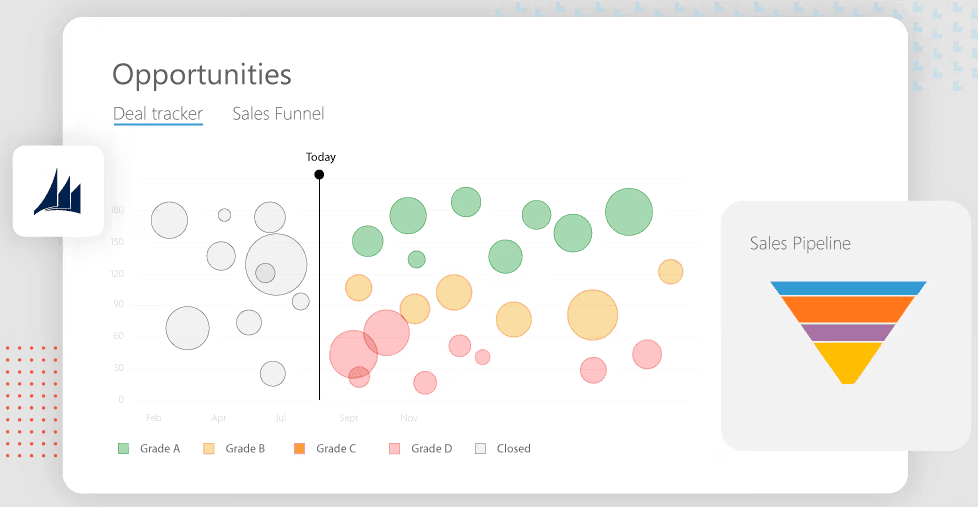
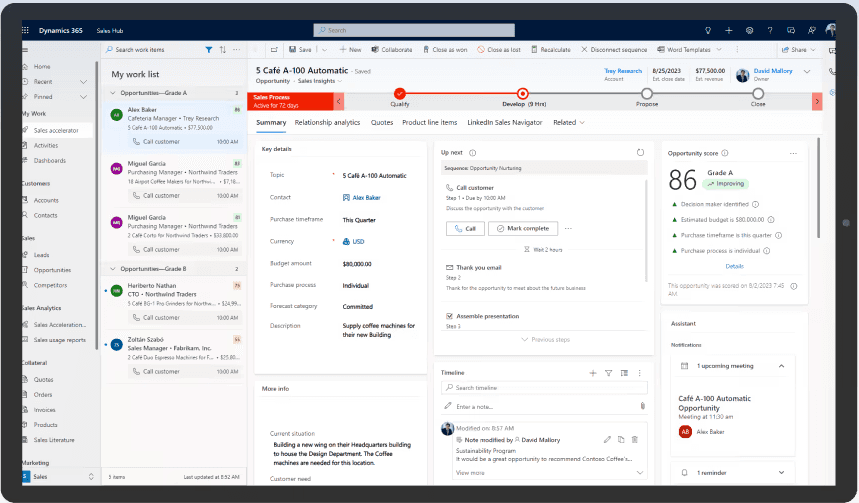
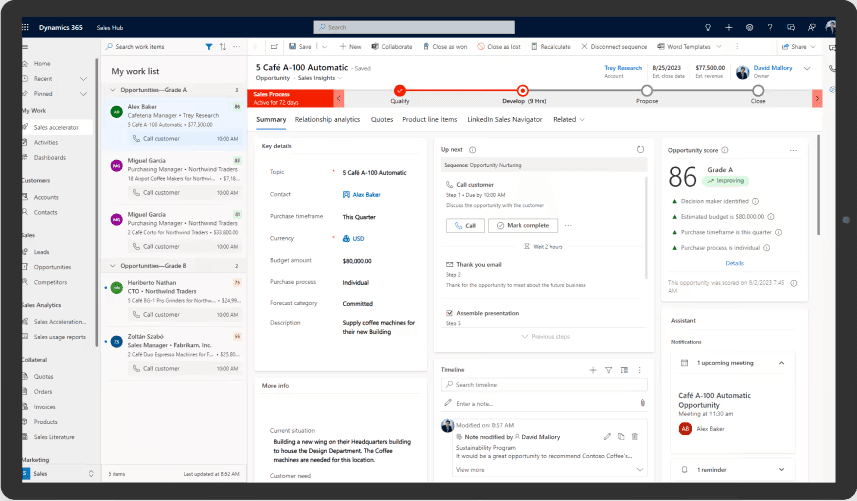
The system tracks leads from first interaction through to conversion. Every email, meeting, quote, and phone call stays connected to the customer profile.
No more digging through inboxes.
Sales reps can:
- Prioritise high-value leads
- Track deal stages
- Set reminders and tasks
- Monitor buying signals
- Forecast revenue
And because the platform uses AI-driven recommendations, it can suggest next steps or identify deals at risk before they collapse.
That part matters more than people think.
Sales Forecasting
Forecasting in spreadsheets is painful. Everyone knows it.
Dynamics 365 automates large parts of the process by analysing historical sales data, current pipelines, and customer activity patterns.
Managers can spot trends early instead of reacting too late.
Relationship Intelligence
One of the more useful Features of Dynamics 365 CRM is relationship analytics.
The system measures customer engagement levels based on communication frequency, response times, and interactions. If an important client suddenly stops engaging, teams see warning signs immediately.
It feels subtle at first. Then you realise how much risk it helps prevent.
Mobile Sales Access
Salespeople rarely sit at desks all day.
The mobile CRM app lets teams update opportunities, access customer records, and manage tasks from anywhere. Airport lounge. Client office. Coffee shop. Doesn’t matter.
That flexibility has become essential rather than optional.
Dynamics 365 CRM Customer Service Features
Customer service can make or destroy loyalty surprisingly fast.
A single unresolved issue can undo years of trust. That’s why the Dynamics 365 CRM Customer Service Features focus heavily on speed, consistency, and personalisation.
Case Management
Support agents can track customer issues from creation to resolution in one place.
Every interaction stays logged automatically, including:
- Emails
- Chats
- Phone calls
- Escalations
- Service notes
This prevents customers from repeating themselves over and over again. Which, frankly, everybody hates.
Omnichannel Support
Customers expect support on their preferred channel now. Not yours.
Dynamics 365 supports:
- Live chat
- Social messaging
- Voice support
- Self-service portals
And all conversations remain connected to a single customer record.
That continuity is a massive advantage.
Knowledge Base Integration
Support teams can create internal and customer-facing knowledge articles directly inside the CRM.
This helps agents resolve cases faster while giving customers self-service options for common issues.
Less waiting. Faster answers. Better experience overall.
Service Level Agreement Tracking
The platform also monitors SLA performance automatically.
If response times are slipping or cases risk breaching deadlines, managers receive alerts before problems escalate.
That’s one of those small but incredibly valuable Dynamics 365 CRM Capabilities businesses appreciate after implementation.
Dynamics 365 CRM Customer Insight Features
Understanding customers properly is harder than it sounds.
Most businesses collect data constantly but struggle to turn it into something useful. The Dynamics 365 CRM Customer Insight Features help bridge that gap.
Unified Customer Profiles
Customer data often lives in disconnected systems:
- CRM databases
- Email tools
- E-commerce platforms
- Service systems
- Marketing software
Dynamics 365 pulls those records together into a unified customer profile.
This creates a much more accurate view of customer behaviour and preferences.
Predictive Insights
AI models analyse customer activity patterns and generate predictions such as:
- Churn risk
- Purchase likelihood
- Engagement scores
- Recommended products
It’s not magic. But it’s incredibly useful for prioritisation.
Especially for growing businesses trying to scale without wasting time on low-value opportunities.
Customer Segmentation
Marketing and sales teams can segment audiences based on behaviour, demographics, interactions, and purchase history.
That allows businesses to create highly targeted campaigns instead of generic messaging blasts nobody wants to read.
Dynamics 365 CRM Automation Features
Automation changes everything when used properly.
Not because it replaces people. Because it removes repetitive admin work that drains time and energy.
The Dynamics 365 CRM Automation Features are one of the strongest reasons organisations invest in the platform.
Workflow Automation
Businesses can automate tasks such as:
- Lead assignment
- Approval processes
- Follow-up reminders
- Email notifications
- Opportunity updates
Small automations save ridiculous amounts of time over months.
And they reduce human error too.
AI-Powered Recommendations
The CRM analyses user behaviour and customer activity to recommend actions automatically.
For example:
- Suggesting the best time to contact a lead
- Recommending products for upselling
- Identifying inactive customers
That intelligence helps teams make better decisions faster.
Power Automate Integration
Integration with Microsoft Power Automate expands automation capabilities even further.
Businesses can connect Dynamics 365 with external systems and automate processes across departments without heavy coding requirements.
That flexibility matters enormously for scaling organisations.
Dynamics 365 Customer Engagement Features
Customer engagement isn’t just about replying quickly anymore.
Customers expect personalised interactions. Relevant communication. Consistency across channels. The full experience.
The Dynamics 365 Customer Engagement Features support all of that.
Personalised Communication
Because the CRM stores detailed customer histories, businesses can tailor communication based on previous interactions and preferences.
Customers notice when interactions feel relevant.
They also notice immediately when they don’t.
Marketing Campaign Management
Teams can create, manage, and measure campaigns directly from the CRM platform.
This includes:
- Email marketing
- Customer journeys
- Event management
- Lead nurturing
- Campaign analytics
Everything connects back to customer records and sales outcomes.
Which finally gives marketing teams clearer ROI visibility.
Real-Time Engagement Tracking
The platform tracks customer interactions in real time, helping businesses understand:
- Email opens
- Website visits
- Event participation
- Campaign responses
That data improves targeting and follow-up timing significantly.
Dynamics 365 CRM Tools for Business Insights
Beyond the core modules, several Dynamics 365 CRM Tools improve usability and reporting.
Dashboards and Reporting
Custom dashboards provide live business visibility.
Managers can track:
- Sales performance
- Customer service metrics
- Marketing ROI
- Pipeline health
- Customer satisfaction trends
And because of integration with Power BI, reporting becomes far more visual and interactive.
Integration with Microsoft Ecosystem
This is one of the platform’s biggest strengths.
Dynamics 365 integrates naturally with:
- Microsoft Outlook
- Microsoft Teams
- Excel
- SharePoint
That reduces friction for employees because they can work inside familiar tools rather than constantly switching platforms.
Customisation and Low-Code Development
Businesses rarely operate the same way.
Dynamics 365 supports extensive customisation using low-code tools through Microsoft Power Platform.
Companies can build custom workflows, dashboards, apps, and integrations without massive development projects.
That agility becomes a competitive advantage surprisingly quickly.
Key Features of Dynamics 365 CRM for Businesses
When organisations evaluate CRM systems, they usually focus on practical outcomes rather than technical specifications.
So, what are the Key Features of Dynamics 365 CRM for Businesses that genuinely matter?
Here’s the shortlist:
Scalability
Small businesses can start with basic modules and expand gradually.
Large enterprises can support global operations across multiple departments and regions.
Same ecosystem. Different scale.
Cloud Accessibility
Because it’s cloud-based, employees can access the CRM securely from almost anywhere.
Remote work becomes much easier to manage.
Security and Compliance
Microsoft invests heavily in enterprise-grade security and compliance standards.
For industries handling sensitive customer data, that’s a major factor.
AI and Analytics
AI-powered insights help businesses make faster and smarter decisions without relying entirely on manual reporting.
And honestly, modern CRM platforms need this now. It’s no longer a bonus feature.
Dynamics 365 CRM Features and Benefits
Features are nice. Outcomes matter more.
The biggest Dynamics 365 CRM Features and Benefits usually include:
- Improved customer retention
- Faster sales cycles
- Better collaboration
- Reduced manual administration
- More accurate forecasting
- Higher service efficiency
- Stronger customer insights
- Better marketing performance
The platform creates operational visibility that many businesses simply don’t have before implementation.
That visibility changes decision-making dramatically.
What Are the Features of Dynamics 365 CRM That Stand Out Most?
If someone asked for the headline answer to “What are the features of Dynamics 365 CRM?”, these would probably top the list:
- AI-driven customer insights
- Sales automation
- Omnichannel customer service
- Workflow automation
- Real-time reporting
- Deep Microsoft integration
- Mobile CRM access
- Marketing and engagement tools
- Customisable dashboards
- Predictive analytics
Not flashy for the sake of being flashy. Just genuinely useful business functionality.
And that’s probably why the platform continues growing across industries.
Dynamics CRM Implementation: What Businesses Should Expect
Here’s the reality.
Even the best CRM system fails if implementation goes badly.
A successful Dynamics CRM Implementation usually depends on planning, user adoption, and process alignment more than software itself.
Discovery and Process Mapping
Before implementation starts, businesses need to understand:
- Existing workflows
- Pain points
- Reporting requirements
- Customer journey stages
- Integration needs
Skipping this stage creates expensive problems later.
Every single time.
Data Migration
Migrating customer data from legacy systems needs careful handling.
Poor data quality damages CRM performance quickly, so cleansing and validation are critical during implementation.
Messy data in means messy reporting out.
Simple as that.
User Training
One overlooked issue in CRM projects? Adoption.
If employees don’t understand how the platform helps them, usage drops immediately.
Training should focus on practical workflows rather than overwhelming users with every feature at once.
Ongoing Optimisation
CRM systems are never really “finished”.
Businesses evolve. Processes change. Customer expectations shift.
Successful organisations continuously refine workflows, automations, dashboards, and reporting over time.
That ongoing optimisation is where long-term value appears.
Some FAQ
1. What are the main features of Microsoft Dynamics CRM for UK businesses?
Microsoft Dynamics CRM offers a wide range of features including contact management, sales automation, customer service tools, marketing automation, reporting dashboards, workflow automation, and AI-powered insights. UK businesses also benefit from cloud accessibility, Microsoft 365 integration, and GDPR-supportive security controls.
2. How does Dynamics CRM help improve customer relationship management?
Dynamics CRM centralises customer information in one platform, making it easier for teams to track interactions, manage leads, respond to enquiries quickly, and personalise customer communication. This helps improve customer satisfaction, retention, and overall business efficiency.
3. Can Microsoft Dynamics CRM integrate with other Microsoft products like Outlook and Teams?
Yes, Microsoft Dynamics CRM integrates seamlessly with Microsoft products such as Outlook, Teams, Excel, SharePoint, and Power BI. This allows employees to collaborate more effectively, access customer data directly from familiar tools, and streamline daily workflows.
4. Is Dynamics CRM suitable for small and medium-sized businesses in the UK?
Yes, Dynamics CRM is highly scalable and suitable for businesses of all sizes. UK SMEs can start with essential CRM features and expand functionality as their business grows, making it a cost-effective and flexible solution.
5. What automation features are available in Microsoft Dynamics CRM?
Dynamics CRM includes automation tools for lead nurturing, email marketing, customer follow-ups, sales workflows, task assignments, and case management. Automation reduces manual work, improves response times, and increases operational productivity.
6. How secure is Microsoft Dynamics CRM for handling customer data in the UK?
Microsoft Dynamics CRM includes enterprise-grade security features such as role-based access controls, multi-factor authentication, encrypted data storage, and regular security updates. Microsoft also maintains compliance with major international security standards.
7. Does Dynamics CRM support GDPR compliance for UK organisations?
Yes, Dynamics CRM includes features that help organisations support GDPR compliance, such as consent tracking, audit trails, data retention policies, and secure customer data management. However, businesses must also implement their own compliant processes and policies.
8. What reporting and analytics capabilities does Microsoft Dynamics CRM offer?
Dynamics CRM provides real-time dashboards, custom reports, predictive analytics, and integration with Power BI. These tools help businesses monitor sales performance, customer behaviour, marketing campaigns, and operational efficiency.
9. Can Dynamics CRM be customised to suit different industries and business needs?
Yes, Dynamics CRM is highly customisable. Businesses can tailor workflows, dashboards, fields, automation processes, and integrations to meet the needs of industries such as retail, finance, healthcare, manufacturing, and professional services.
10. What are the benefits of using cloud-based Dynamics CRM compared to on-premise solutions?
Cloud-based Dynamics CRM offers advantages such as remote access, automatic updates, lower infrastructure costs, improved scalability, and enhanced disaster recovery. UK businesses also benefit from easier collaboration and reduced IT maintenance requirements.
Final Thoughts
The modern CRM isn’t just a database anymore.
It’s a connected business platform that influences sales, service, marketing, analytics, and customer engagement simultaneously. And the Dynamics 365 CRM Features available today reflect that shift clearly.
From automation and AI insights to customer service management and sales forecasting, the platform helps businesses operate with more visibility and far less friction.
Of course, technology alone won’t fix broken processes. It won’t magically create customer loyalty either. But when implemented properly, Microsoft Dynamics 365 CRM gives organisations the tools to build stronger relationships, improve efficiency, and make smarter business decisions at scale.
And in competitive markets, that edge matters. A lot.
Ready to make your customer relationships work smarter, not harder?
Dynamics Square UK helps businesses unlock the full potential of Microsoft Dynamics 365 CRM without the usual complexity or drawn-out implementation headaches.
Whether you want better sales visibility, stronger customer engagement, or smoother automation across teams, their experts know how to turn CRM into something genuinely useful. No fluff. No one-size-fits-all approach.
Just practical solutions that help your business grow faster and operate more efficiently.
Connect with Dynamics Square UK today and see what Dynamics 365 CRM can really do for your business.
If you need any help, don't hesitate to reach out to us. You can give us a call at
+ 44-203-769-7689 or send us an email at info@dynamicssquare.co.uk.