
Credit management in Dynamics 365 Finance helps businesses control customer credit exposure, manage credit limits, assess credit risk, and prevent potentially risky sales transactions. By using automated credit checks, risk scores, blocking rules, credit holds, and workflows, finance teams can reduce bad-debt risk while maintaining better control over accounts receivable and cash flow.
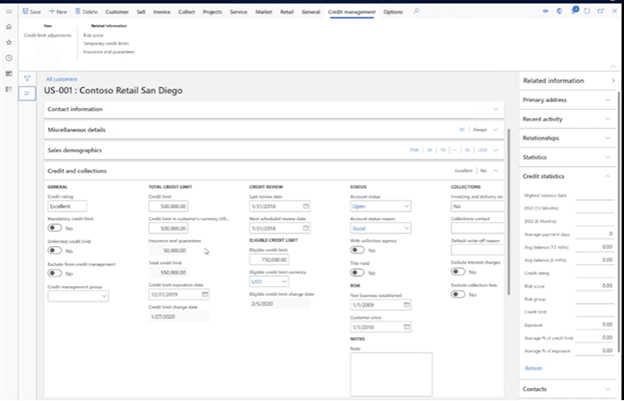
Table of Contents
- Key Takeaways
- What is Credit Management in Dynamics 365 Finance?
- How Does Credit Management Work in Dynamics 365 Finance?
- Key Credit Management Features in Dynamics 365 Finance
- Credit Management Blocking Rules in Dynamics 365 Finance
- Example of Credit Management in Dynamics 365 Finance
- Benefits of Credit Management in Dynamics 365 Finance
- Credit Management vs Collections in Dynamics 365 Finance
- How to Implement Credit Management in Dynamics 365 Finance
- Who Can Benefit from Credit Management in Dynamics 365 Finance?
- Need Help Implementing Credit Management in Dynamics 365 Finance?
- Some FAQs About Credit Management in Dynamics 365 Finance
Key Takeaways
- Dynamics 365 Finance helps businesses manage customer credit limits and credit exposure.
- Credit management can evaluate customers using credit information and risk scores.
- Blocking rules can control sales orders based on credit limits, overdue amounts, payment terms, and other conditions.
- Finance teams can use credit holds to review sales orders that do not meet defined credit policies.
- Credit limit adjustments and temporary credit limits help businesses respond to changing customer requirements.
- Credit management works alongside collections to improve accounts receivable and cash flow management.
- Proper configuration can reduce manual credit checks and improve financial risk control.
What is Credit Management in Dynamics 365 Finance?
Credit management in Dynamics 365 Finance is a set of capabilities that helps organisations assess customer creditworthiness, manage credit limits, monitor credit exposure, and control sales transactions according to predefined credit policies.
Traditionally, finance teams may have relied on manual checks of customer records, payment history, outstanding invoices, and credit limits before approving sales transactions. Manual processes can be time-consuming and may increase the risk of inconsistent credit decisions.
With Dynamics 365 Finance, businesses can automate many credit-control processes using customer credit information, risk scores, blocking rules, credit holds, and workflows. This gives credit and accounts receivable teams greater visibility into customer exposure and helps them make more consistent decisions.
Credit management is closely connected with accounts receivable and collections processes. While credit management focuses largely on controlling credit risk and customer exposure, collections focuses on recovering outstanding receivables.
How Does Credit Management Work in Dynamics 365 Finance?
Credit management in Dynamics 365 Finance follows a structured process for evaluating customer creditworthiness and controlling sales transactions. Businesses can define their credit policies and configure the system to evaluate customers and sales orders against those policies.
- Customer credit information: Finance teams maintain relevant credit information on customer records.
- Credit limits: A credit limit can be assigned to a customer or managed through customer credit groups.
- Risk assessment: Credit information and risk scores can be used to assess customer credit risk.
- Blocking rules: Businesses define conditions that determine when a sales transaction requires additional review.
- Credit check: When applicable, the system evaluates a sales order against the configured credit criteria.
- Credit hold: If a blocking rule is triggered, the sales order can be placed on credit hold for review.
- Review and release: Credit teams can investigate the issue and release the order when the required conditions or approvals are satisfied.
Key Credit Management Features in Dynamics 365 Finance
Customer Credit Management Groups
Credit management groups allow businesses to classify customers according to common credit-management requirements. Instead of maintaining every credit policy independently, organisations can group customers with similar characteristics and apply relevant credit-management settings.
This can help finance teams standardise credit policies across customers while reducing repetitive manual work.
Credit Limits
Credit limits define the amount of financial exposure a business is prepared to accept for a customer. Dynamics 365 Finance allows organisations to manage customer credit limits and use them as part of the credit evaluation process.
Credit limits can be considered when sales orders are created or processed. If a customer reaches or exceeds the configured credit threshold, the applicable credit-management rules can require further review before the transaction continues.
Credit Limit Adjustments and Temporary Credit Limits
Customer requirements can change over time. A customer may need additional credit for a large seasonal order, a temporary business requirement, or another approved commercial situation.
Dynamics 365 Finance provides capabilities for managing credit limit adjustments and temporary credit limits, helping businesses respond to changing circumstances while maintaining control over financial exposure.
Scoring Groups
Scoring groups help organisations classify customers according to defined credit-risk criteria. Finance teams can establish scoring parameters and use relevant customer information to support credit-risk assessment.
This provides a more structured approach to identifying customers that may require additional monitoring or review.
Risk Scores
Risk scores help finance teams evaluate customer credit risk using relevant financial and customer information. Instead of relying entirely on manual judgement, organisations can establish defined scoring approaches to support more consistent credit decisions.
Risk scoring can be used alongside credit limits and blocking rules to determine whether a customer or sales transaction requires additional attention.
Blocking Rules
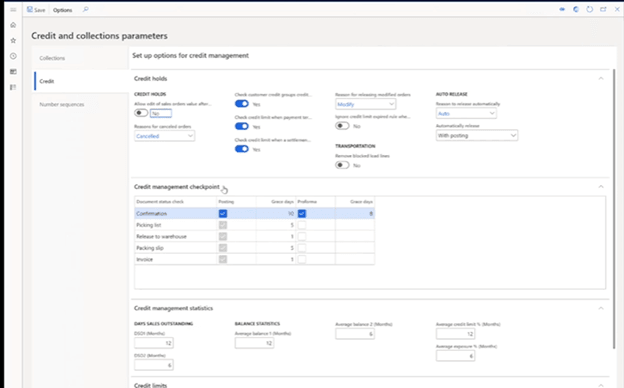
Blocking rules are conditions that determine when a customer or sales order should be prevented from progressing automatically through a business process. These rules help organisations apply their credit policy consistently.
Depending on the configuration, credit-management blocking rules can consider factors such as overdue amounts, overdue days, credit-limit usage, expired credit limits, sales order amounts, payment terms, and other credit-related conditions.
| Blocking Condition | Purpose |
|---|---|
| Days overdue | Identifies customers whose invoices have remained unpaid beyond the permitted period. |
| Overdue amount | Helps identify customers with outstanding overdue balances above the configured threshold. |
| Credit limit used | Monitors how much of the customer's available credit has already been used. |
| Credit limit expiry | Identifies situations where a customer's credit limit has expired. |
| Sales order amount | Allows businesses to apply credit controls based on the value of a sales order. |
| Payment terms | Can be used as part of the conditions applied to customer credit checks. |
Credit Holds
A credit hold can prevent a sales order from continuing through the relevant process when a configured credit-management rule has been triggered. For example, an order may require review if the customer has exceeded a credit limit or has an overdue balance.
Credit teams can review the reason for the hold, investigate the customer's credit position, and release the order when the issue has been resolved or the required approval has been obtained.
Grace Period
A grace period can provide additional flexibility when businesses need to manage customers that meet certain blocking conditions. It allows organisations to define specific parameters before a credit restriction is applied or maintained.
This can be useful when a business wants to balance credit-risk control with established customer relationships and commercial requirements.
Credit Management Workflows
Workflows can help organisations introduce approval controls into credit-management processes. For example, a business can establish an approval process for credit limit adjustments so that changes are reviewed by the appropriate finance or credit-management personnel.
Workflow-based approvals can improve accountability, reduce manual communication, and help organisations maintain consistent credit policies.
Deduction Management
Businesses often deal with deductions, discounts, claims, and other customer-related financial adjustments. Manually tracking these transactions can make it difficult for finance teams to maintain accurate records and resolve outstanding issues.
Dynamics 365 Finance provides capabilities that can help organisations manage deductions and establish processes for reviewing and approving relevant transactions.
Case Management
Case management helps finance teams organise customer-related issues and activities. By maintaining relevant customer interactions and case information, teams can improve visibility into disputes, payment issues, credit concerns, and other receivables-related activities.
Collection Letters
Collection letters help businesses communicate with customers regarding overdue payments. Organisations can establish different collection stages and send appropriate communications based on their collection policy.
For example, a business may begin with a payment reminder and then escalate communication if the outstanding balance remains unpaid. This structured approach can help accounts receivable teams maintain consistent collection processes.
Credit Management Blocking Rules in Dynamics 365 Finance
One of the important advantages of credit management in Dynamics 365 Finance is the ability to define rules that determine when sales transactions require additional credit review.
For example, a business may configure a rule that triggers a credit hold when a customer has exceeded a defined credit limit or when overdue invoices reach a specific threshold.
These automated checks reduce the need for finance teams to manually review every sales transaction and allow them to focus on customers or orders that actually require attention.
Example of Credit Management in Dynamics 365 Finance
Consider a distributor that provides a customer with a credit limit of £50,000. The customer has already used £45,000 of the available credit and then places a new sales order worth £15,000.
When the applicable credit-management checks are performed, the transaction may exceed the customer's permitted exposure. If the configured blocking rules identify the order as requiring review, the sales order can be placed on credit hold.
The credit team can then review the customer's payment history, outstanding balance, risk profile, and business circumstances. The order can be released if the credit team approves the additional exposure or after the customer resolves the outstanding credit issue.
Benefits of Credit Management in Dynamics 365 Finance
Reduce Credit Risk
Automated credit checks and predefined policies can help organisations identify potentially risky transactions before they increase customer exposure.
Improve Cash Flow Control
Better visibility into credit exposure, overdue receivables, and customer payment behaviour can help finance teams make more informed decisions and support healthier cash flow.
Automate Credit Checks
Businesses can reduce repetitive manual checks by using automated rules and credit-management processes to identify transactions that require review.
Improve Finance Team Productivity
By automating routine credit-control activities, finance professionals can spend more time on exceptions, customer disputes, collections, and higher-value financial activities.
Standardise Credit Policies
Defined credit limits, risk scores, blocking rules, and approval workflows help organisations apply consistent credit policies across customers and transactions.
Improve Sales Order Control
Credit holds and blocking rules help businesses prevent sales transactions from progressing when they do not meet established credit requirements.
Credit Management vs Collections in Dynamics 365 Finance
Credit management and collections are closely related but serve different purposes within accounts receivable.
| Credit Management | Collections |
|---|---|
| Focuses on controlling customer credit exposure. | Focuses on recovering outstanding receivables. |
| Uses credit limits and risk information. | Uses collection activities and customer follow-ups. |
| Can help prevent excessive customer exposure. | Helps recover overdue customer balances. |
| Can place sales orders on credit hold. | Helps manage overdue invoices and collection activities. |
Using both credit management and collections processes together can give finance teams better control over the complete customer receivables lifecycle.
How to Implement Credit Management in Dynamics 365 Finance
Successful credit management implementation starts with understanding the organisation's existing credit policy and translating it into appropriate system rules.
- Review credit policies: Identify how your organisation currently evaluates customers and manages credit exposure.
- Define customer credit groups: Group customers where common credit policies can be applied.
- Configure credit limits: Establish appropriate customer or group-level credit limits.
- Define risk criteria: Determine the information and scoring approach used to assess customer credit risk.
- Configure blocking rules: Establish conditions for overdue amounts, credit-limit usage, sales orders, and other relevant scenarios.
- Configure workflows: Add approval processes for credit limit changes and other activities where required.
- Test credit scenarios: Test normal transactions as well as customers that exceed credit limits or meet blocking conditions.
- Train finance users: Ensure credit, accounts receivable, sales, and finance teams understand the new process.
Working with an experienced Dynamics 365 Finance partner can help organisations design and configure credit-management processes according to their operational and financial requirements.
Who Can Benefit from Credit Management in Dynamics 365 Finance?
Credit management can be particularly valuable for organisations that sell products or services on credit and need greater control over customer exposure.
- CFOs and Finance Directors: Gain greater visibility into financial exposure and receivables risk.
- Credit Managers: Manage customer credit limits, risk scores, blocking rules, and credit holds.
- Accounts Receivable Teams: Improve control over overdue balances and collection activities.
- Sales Teams: Reduce unexpected order delays by having clearer customer credit controls.
- Finance Departments: Automate repetitive credit checks and standardise credit policies.
Need Help Implementing Credit Management in Dynamics 365 Finance?
Configuring credit limits, risk scores, blocking rules, credit holds, workflows, and collections processes correctly can help finance teams reduce credit risk without unnecessarily slowing down sales.
Dynamics Square can help organisations assess their requirements, configure Dynamics 365 Finance, migrate financial data, integrate related systems, and provide ongoing support.
Whether you are implementing Dynamics 365 Finance for the first time or improving an existing finance environment, our Microsoft Dynamics 365 consultants can help you build a credit-management process aligned with your business policies.
Ready to improve credit control and accounts receivable processes? Speak with a Dynamics 365 Finance consultant today.
Talk to a Dynamics 365 Finance Consultant
Some FAQs About Credit Management in Dynamics 365 Finance
What is credit management in Dynamics 365 Finance?
Credit management in Dynamics 365 Finance helps businesses manage customer credit limits, assess credit risk, monitor credit exposure, and control sales transactions using predefined credit policies.
What are credit management blocking rules?
Blocking rules are conditions that determine when a customer or sales order requires additional credit review. They can be based on factors such as overdue amounts, overdue days, credit-limit usage, sales order amounts, and other configured criteria.
What is a credit hold in Dynamics 365 Finance?
A credit hold prevents a sales order from progressing when a configured credit-management condition has been triggered. A credit team can review the transaction and release it when the required conditions or approvals are met.
Can Dynamics 365 Finance manage customer credit limits?
Yes. Dynamics 365 Finance provides capabilities for managing customer credit limits and using credit-limit information as part of credit-management checks.
Can credit limits be temporarily adjusted?
Yes. Businesses can use credit limit adjustments and temporary credit limits to accommodate approved changes in customer requirements while maintaining financial controls.
What is the difference between credit management and collections?
Credit management primarily focuses on assessing and controlling customer credit exposure, while collections focuses on recovering outstanding receivables and overdue customer balances.
How does credit management improve cash flow?
Credit management can help businesses control customer exposure, identify risky transactions earlier, reduce unnecessary credit risk, and improve visibility into outstanding receivables.
Can Dynamics 365 Finance automate credit checks?
Yes. Businesses can configure credit-management rules and related processes to automate checks and identify sales transactions that require additional review.
How can I implement credit management in Dynamics 365 Finance?
Implementation typically involves reviewing credit policies, configuring customer credit information and limits, setting up risk criteria and blocking rules, configuring workflows, testing credit scenarios, and training finance users.
.png&w=3840&q=75&dpl=dpl_37DAUvuSUR2i2fpUx5yhPbWLjkwx)